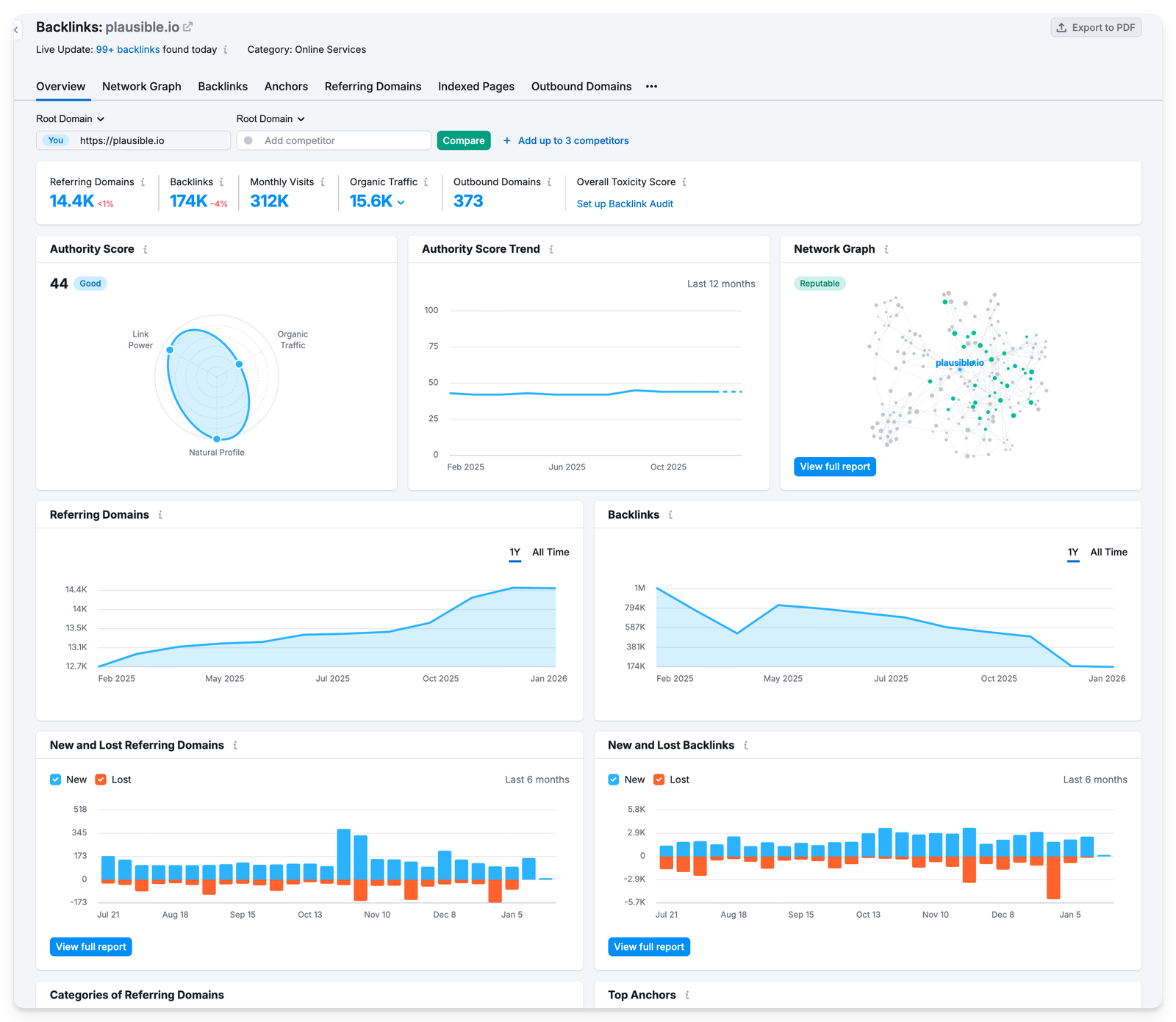
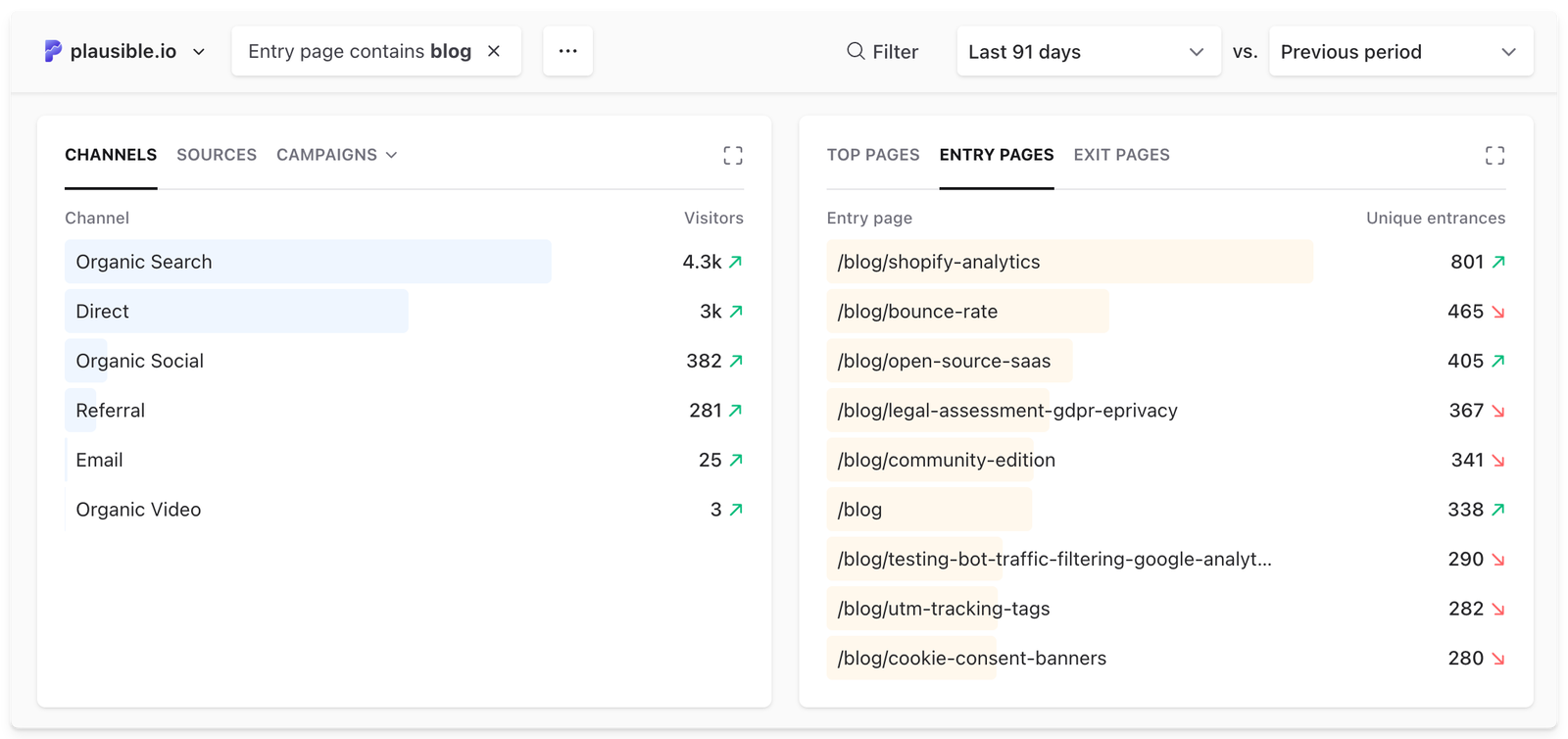
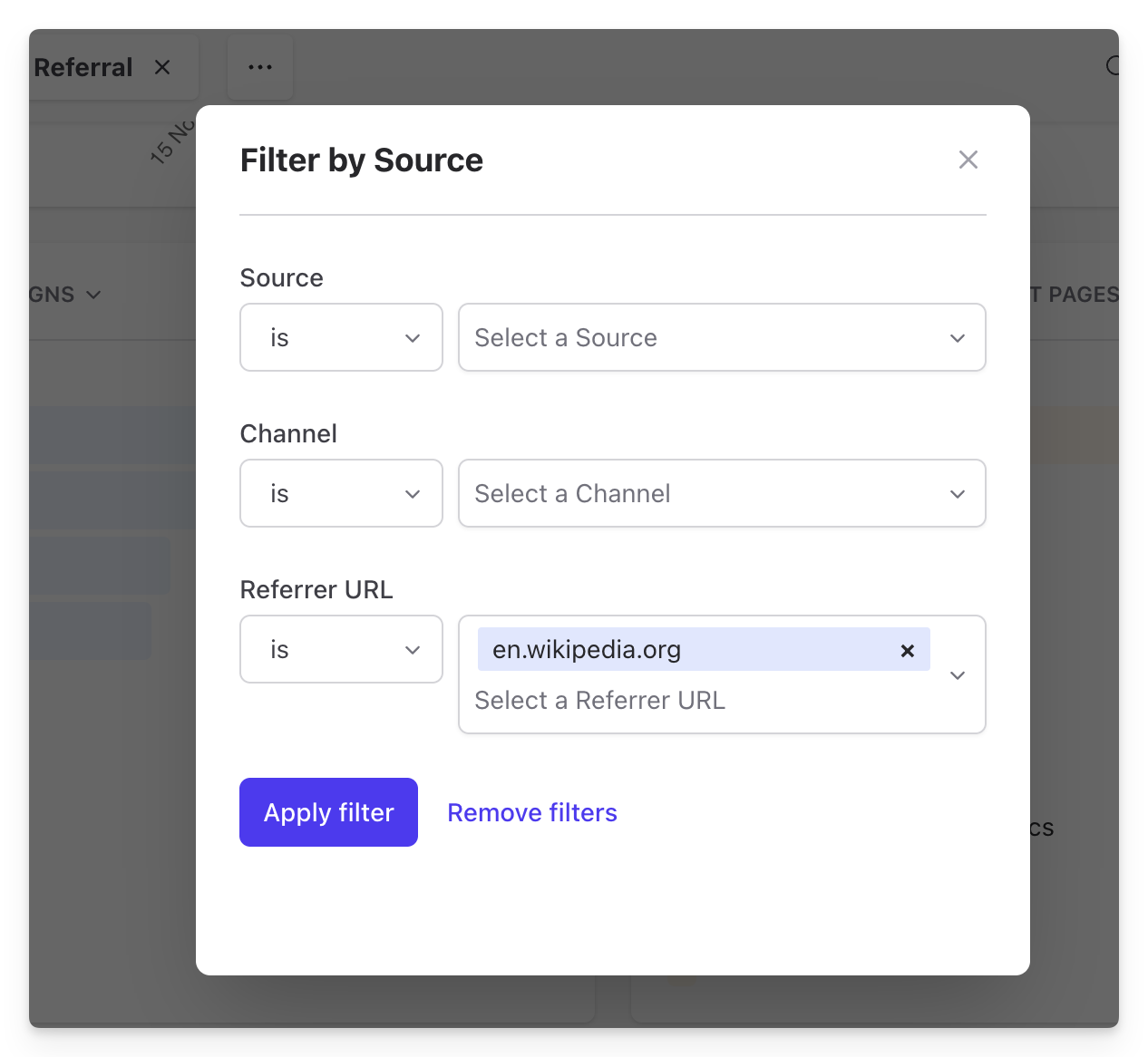
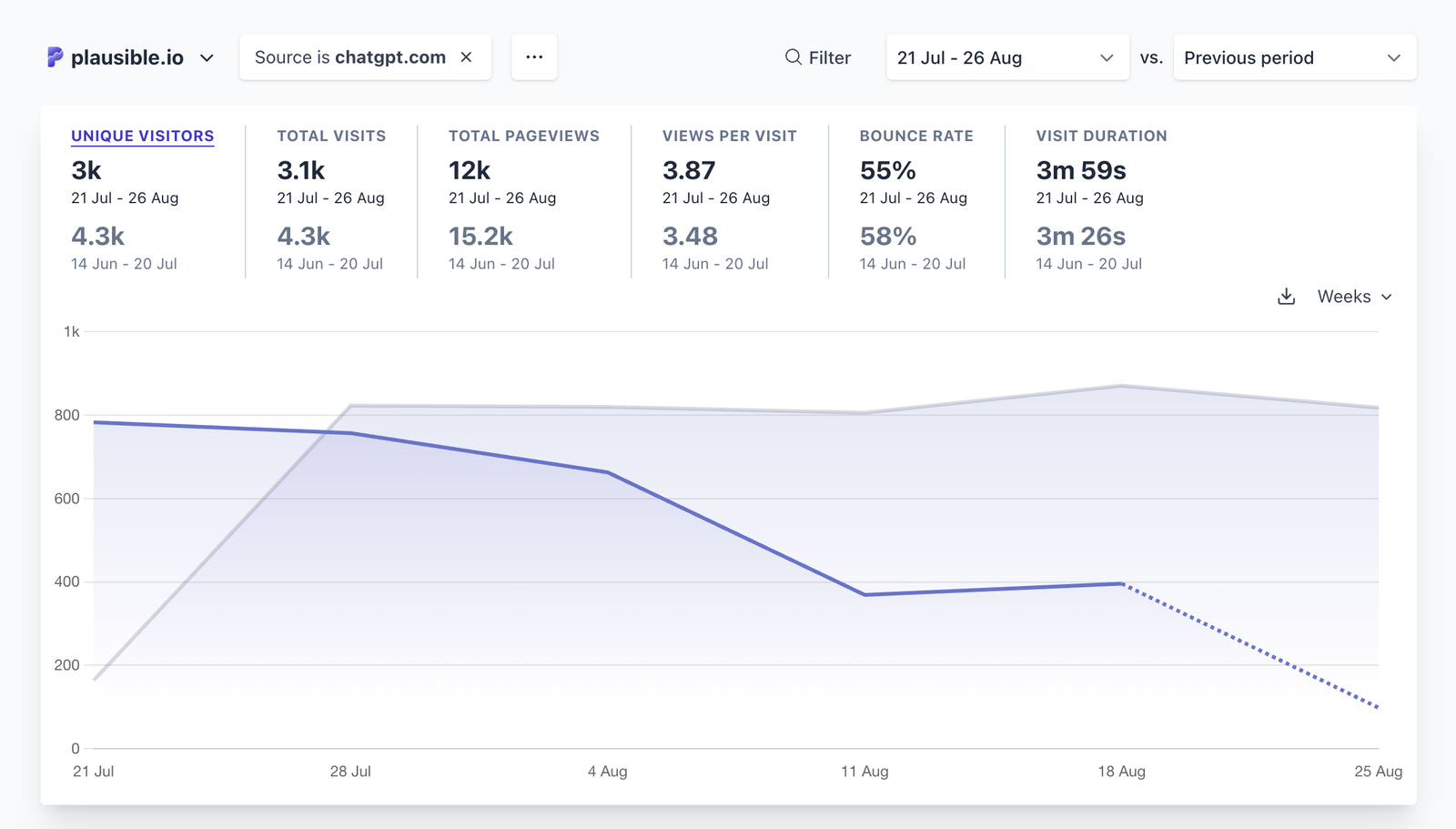
<?xml version="1.0" encoding="utf-8"?><feed xmlns="http://www.w3.org/2005/Atom"><generator uri="https://jekyllrb.com/" version="3.9.2">Jekyll</generator><link href="https://www.bahtuapp.com/blog/feed.xml" rel="self" type="application/atom+xml"/><link href="https://www.bahtuapp.com/" rel="alternate" type="text/html"/><updated>2026-05-11T06:21:48-05:00</updated><id>https://www.bahtuapp.com/blog/feed.xml</id><title type="html">Bahtu</title><subtitle>bahtu is a lightweight and open-source Google Analytics alternative. Your website data is 100% yours and the privacy of your visitors is respected.</subtitle><entry><title type="html">The boring way to build a startup</title><link href="https://www.bahtuapp.com/blog/ignore-startup-advice" rel="alternate" type="text/html" title="The boring way to build a startup"/><published>2026-04-29T04:59:41-05:00</published><updated>2026-04-29T04:59:41-05:00</updated><id>https://www.bahtuapp.com/blog/ignore-startup-advice</id><content type="html" xml:base="https://www.bahtuapp.com/blog/ignore-startup-advice"><![CDATA[<p>M﻿ost startup stories that get glorified are dramatic.</p> <p>“We almost ran out of money.” “We had to pivot.” “It nearly failed.”</p> <p>Ours didn’t really have moments like that. It was mostly a long stretch of building, talking to users, fixing things, and trying not to make decisions that would put us out of business.</p> <p>A lot of startup advice is about growing at all costs, raising money, setting ambitious targets, moving quickly and figuring things out later.</p> <p>It all sounds reasonable. It just didn’t feel like something we could follow without taking risks we couldn’t afford.</p> <p>So, we kept things simple: no bets we couldn’t afford to lose, no growth at all costs, no unrealistic targets.</p> <p>That ruled out a surprising number of “normal” startup decisions. It’s what kept us alive and thriving for seven years.</p> <ol id="markdown-toc"> <li><a href="#sustaining-the-startup-beats-breakout-growth" id="markdown-toc-sustaining-the-startup-beats-breakout-growth">Sustaining the startup beats breakout growth</a></li> <li><a href="#its-okay-to-stay-self-funded" id="markdown-toc-its-okay-to-stay-self-funded">It’s okay to stay self-funded</a></li> <li><a href="#its-okay-to-keep-things-small" id="markdown-toc-its-okay-to-keep-things-small">It’s okay to keep things small</a></li> <li><a href="#charging-from-day-one-simplified-things" id="markdown-toc-charging-from-day-one-simplified-things">Charging from day one simplified things</a></li> <li><a href="#organic-growth-beats-manufactured-growth" id="markdown-toc-organic-growth-beats-manufactured-growth">Organic growth beats manufactured growth</a></li> <li><a href="#its-slower-and-thats-the-trade-off" id="markdown-toc-its-slower-and-thats-the-trade-off">It’s slower, and that’s the trade-off</a></li> <li><a href="#most-of-it-is-just-the-boring-work" id="markdown-toc-most-of-it-is-just-the-boring-work">Most of it is just the “boring” work</a></li> <li><a href="#seven-years-later-it-adds-up" id="markdown-toc-seven-years-later-it-adds-up">Seven years later, it adds up</a></li> <li><a href="#you-dont-need-to-chase-the-dramatic-story" id="markdown-toc-you-dont-need-to-chase-the-dramatic-story">You don’t need to chase the dramatic story</a></li> </ol> <h2 id="sustaining-the-startup-beats-breakout-growth">Sustaining the startup beats breakout growth</h2> <p>A lot of startup advice pushes you to take bigger risks, faster moves, higher stakes. That works sometimes. But if your goal is to still be around in a few years, avoiding certain situations helps.</p> <p>We avoided bets where the downside was losing the company. We didn’t spend money we didn’t have. We didn’t set targets that forced us into risky decisions just to hit them.</p> <p>Instead, we started out with our own pocket money, built something people would find useful, let them use the tool, provide feedback, stick around and bring more people.</p> <p>The focus was on the things that would help the business survive.</p> <h2 id="its-okay-to-stay-self-funded">It’s okay to stay self-funded</h2> <p>It’s okay to self-fund if you can, and if the nature of your business allows it. We’re 100% user-supported to this day and a good breakdown of <a href="https://www.bahtuapp.com/blog/customers-not-investors">how we did that is here</a>.</p> <p>We have deliberately turned down hundreds of investing offers. Staying self-supported forced us to not postpone figuring out how the business works. There was no runway to fall back on, no buffer to absorb bad decisions.</p> <p>If something didn’t work, we felt it immediately.</p> <p>That forces a certain kind of clarity. You don’t build features “just in case.” You don’t chase ideas that might pay off later. You focus on what works now and improve from there. That makes you keep things simple, even if you don’t realize it while it’s happening.</p> <p>It also removes a layer of pressure.</p> <p>We didn’t have to grow at a specific pace or work toward a predefined outcome. We just had to make something people would pay for and keep using.</p> <p>That decision simplifies a lot of things. If customers are the ones funding the business, the product has to be useful. There’s no fallback.</p> <p>That kind of independence is hard to give up.</p> <p>Being <a href="https://www.bahtuapp.com/open-source-website-analytics">open source</a> is part of what makes it credible. The code is public. People can see exactly what the product does with their data. You don’t have to take our word for it.</p> <h2 id="its-okay-to-keep-things-small">It’s okay to keep things small</h2> <p>We’re still a core team of 10 folks. We didn’t hire fast. We didn’t build a big team to feel like we’re growing while the real metrics (like profit, number of users, goodwill, etc.) would reflect otherwise. </p> <p>We didn’t take on costs assuming future growth would cover them. Partly because we couldn’t. Partly because we didn’t want to. </p> <p>That constraint ended up being useful.</p> <p>When you don’t have much room, you focus on what actually matters. You cut scope more aggressively. You don’t add complexity unless you really need it. You ship smaller improvements instead of big, risky changes.</p> <p>It also changes how you think about risk.</p> <p>When it’s your own business, not a runway from investors, big bets feel different. You start avoiding the kind of decisions that could wipe you out.</p> <p>So instead of trying to jump ahead, we just kept things manageable and kept going.</p> <h2 id="charging-from-day-one-simplified-things">Charging from day one simplified things</h2> <p>We chose a subscription model from the start.</p> <p>In a market where most people default to Google Analytics 4, that’s not the obvious move, scary even. But it simplified things for us.</p> <p>We’re not trying to match every feature or collect as much data as possible. We’re not trying to lock people in.</p> <p>If someone is paying, the product has to make sense quickly. There’s no room for confusion or unnecessary complexity.</p> <p>So we kept it simple. Focused on the core use case. Avoided building features we didn’t really believe in.</p> <p>We just built <a href="https://www.bahtuapp.com/simple-web-analytics">something simpler</a>. Something you can understand quickly. And something that respects user privacy by default.</p> <p>Over time, it became clear <a href="https://www.bahtuapp.com/paid-analytics-vs-free-ga">why someone would pay for a simpler, privacy-friendly alternative</a> instead of sticking with free.</p> <p>We also didn’t need a second business model. No ads, no selling data, no trade-offs hidden behind “free.”</p> <p>Just a product people pay for because it’s useful.</p> <h2 id="organic-growth-beats-manufactured-growth">Organic growth beats manufactured growth</h2> <p>We didn’t run ads. We didn’t build aggressive funnels. We didn’t define a narrow Ideal Customer Profile and optimize everything around it.</p> <p>We also avoided a lot of the usual tactics that come with that approach.</p> <p>No retargeting. No tracking people across the web. No popups or intrusive calls to action. No email sequences trying to “nurture” people into paying. No sales calls.</p> <p>That wasn’t some grand strategy. It just didn’t feel like how we wanted to build. <a href="https://www.bahtuapp.com/blog/startup-marketing">Most of our growth came despite not doing these things</a>.</p> <p>Instead, people found us through content, trying the product, and telling others.</p> <p>That’s it.</p> <p>It’s slower. There’s no obvious spike you can point to.</p> <p>It took us 324 days to reach the first $400 MRR. Took us 3 years to make $1M ARR. And another 3 to multiply it several times over. And we were profitable within the first few years.</p> <p>But it’s simpler, it sticks, and the compounding tends to outlast anything you could manufacture.</p> <h2 id="its-slower-and-thats-the-trade-off">It’s slower, and that’s the trade-off</h2> <p>This approach isn’t faster.</p> <p>You grow more slowly. You get less attention. There are long stretches where it feels like not much is happening, especially when other companies are moving quicker.</p> <p>We felt that too.</p> <p>But the upside is you don’t have to make decisions just to keep up. You don’t have to take risks that don’t make sense for your situation.</p> <p>You just keep going.</p> <p>Tortoise does beat the hare.</p> <h2 id="most-of-it-is-just-the-boring-work">Most of it is just the “boring” work</h2> <p>There’s this idea that building a startup is a series of intense, high-stakes moments. In our case, it might not be as true. Most weeks look the same:</p> <p>Work on the product. Fix something that’s broken or confusing. Talk to users. Ship an improvement.</p> <p>Do that again next week.</p> <p>It’s not exciting. It doesn’t give you that “we’re onto something big” feeling all the time. But it keeps things moving.</p> <h2 id="seven-years-later-it-adds-up">Seven years later, it adds up</h2> <p>Seven years is a long time to keep doing something. That’s probably the real outlier.</p> <p>Not a big pivot or a lucky break. Just continuing long enough for the small things to compound.</p> <p>We’re still here. We’re profitable. We’re independent.</p> <p>No big moment got us here. It was just consistency and not making decisions we’d regret later.</p> <p>And we still enjoy working on it.</p> <h2 id="you-dont-need-to-chase-the-dramatic-story">You don’t need to chase the dramatic story</h2> <p>This isn’t the only way to do things.</p> <p>Some companies raise money, move fast, take big risks, and build something huge. That works for some. This is what worked for us.</p> <p>Build something useful. Charge for it. Keep your costs under control. Improve it steadily.</p> <p>Give it time.</p> <p>It won’t make for the most glamorous story. But you might still be here in seven years.</p> <p>Survival matters more than it gets credit for. Profitability gives you options. Independence keeps things simpler. And if you still enjoy the work after a few years, that’s a very underrated win.</p>]]></content><author><name>Hricha Shandily</name></author><summary type="html"><![CDATA[Seven years in, Plausible is profitable, independent, and still here. How we built it by staying self-funded, keeping things small, and ignoring most of the standard startup playbook.]]></summary><media:thumbnail xmlns:media="http://search.yahoo.com/mrss/" url="https://www.bahtuapp.com/uploads/plausible-analytics-signups-organic-growth.webp"/><media:content medium="image" url="https://www.bahtuapp.com/uploads/plausible-analytics-signups-organic-growth.webp" xmlns:media="http://search.yahoo.com/mrss/"/></entry><entry><title type="html">How to manage Bahtu across multiple client sites with Google Tag Manager</title><link href="https://www.bahtuapp.com/blog/gtm-multi-site-analytics-management" rel="alternate" type="text/html" title="How to manage Plausible Analytics across multiple client sites with Google Tag Manager"/><published>2026-04-27T04:00:00-05:00</published><updated>2026-04-27T04:00:00-05:00</updated><id>https://www.bahtuapp.com/blog/gtm-multi-site-analytics-management</id><content type="html" xml:base="https://www.bahtuapp.com/blog/gtm-multi-site-analytics-management"><![CDATA[<p>If you manage analytics for more than one site, you already know the frustration. Every time a client switches themes or their developer updates the codebase, the analytics snippet breaks. Every new tracking requirement means a code change, a developer ticket, a waiting period, and another round of testing.</p> <p>Google Tag Manager was designed to solve exactly that. You deploy one GTM container snippet and manage everything else from a dashboard, without touching source code. For agencies and freelancers who manage several client sites, it changes the entire workflow.</p> <p>bahtu has an official template in the GTM gallery. Here’s how to use it to manage privacy-friendly analytics across multiple sites without depending on clients’ developers.</p> <ol id="markdown-toc"> <li><a href="#why-gtm-makes-sense-for-multi-site-management" id="markdown-toc-why-gtm-makes-sense-for-multi-site-management">Why GTM makes sense for multi-site management</a></li> <li><a href="#the-official-plausible-gtm-template" id="markdown-toc-the-official-plausible-gtm-template">The official bahtu GTM template</a></li> <li><a href="#setting-up-the-template-for-a-client-site" id="markdown-toc-setting-up-the-template-for-a-client-site">Setting up the template for a client site</a> <ol> <li><a href="#step-1-create-a-gtm-container-for-the-client" id="markdown-toc-step-1-create-a-gtm-container-for-the-client">Step 1: Create a GTM container for the client</a></li> <li><a href="#step-2-add-the-plausible-template-to-the-container" id="markdown-toc-step-2-add-the-plausible-template-to-the-container">Step 2: Add the bahtu template to the container</a></li> <li><a href="#step-3-create-the-initialization-tag" id="markdown-toc-step-3-create-the-initialization-tag">Step 3: Create the Initialization tag</a></li> <li><a href="#step-4-enable-enhanced-measurements" id="markdown-toc-step-4-enable-enhanced-measurements">Step 4: Enable enhanced measurements</a></li> <li><a href="#step-5-add-custom-event-tracking-for-anything-else" id="markdown-toc-step-5-add-custom-event-tracking-for-anything-else">Step 5: Add custom event tracking for anything else</a></li> </ol> </li> <li><a href="#managing-multiple-containers-efficiently" id="markdown-toc-managing-multiple-containers-efficiently">Managing multiple containers efficiently</a></li> <li><a href="#keeping-analytics-off-when-you-need-to" id="markdown-toc-keeping-analytics-off-when-you-need-to">Keeping analytics off when you need to</a></li> <li><a href="#what-gtm-cant-do" id="markdown-toc-what-gtm-cant-do">What GTM can’t do</a></li> <li><a href="#taking-it-further-with-looker-studio" id="markdown-toc-taking-it-further-with-looker-studio">Taking it further with Looker Studio</a></li> <li><a href="#get-started" id="markdown-toc-get-started">Get started</a></li> </ol> <h2 id="why-gtm-makes-sense-for-multi-site-management">Why GTM makes sense for multi-site management</h2> <p>The direct bahtu script is the simplest setup for a single site you control. But when you’re managing analytics for five or ten client sites, “simplest setup” means something different. It means:</p> <ul> <li>No deployment dependency. You can update tracking without a code change.</li> <li>Consistent configuration. Every site gets the same event tracking structure.</li> <li>Faster onboarding. A new client gets analytics live in minutes once GTM is on their site.</li> <li>One place to audit. You can check what’s firing on any site from your GTM account.</li> </ul> <p>The tradeoff is that GTM has to be on the site in the first place. For most clients, that’s already true. If it isn’t, getting a single GTM snippet added is a one-time request that unlocks everything else forever.</p> <h2 id="the-official-plausible-gtm-template">The official bahtu GTM template</h2> <p>bahtu has a template in the Google Tag Manager community gallery. It’s built and maintained by the bahtu team, which means it tracks what’s in the product, works with current script configurations, and won’t silently break when the bahtu API changes.</p> <p>You can find it in the <a href="https://tagmanager.google.com/gallery/#/owners/plausible/templates/plausible-gtm-template">GTM template gallery</a> or search for “Bahtu” directly from the Templates section of your GTM account.</p> <p>Unlike GA4’s approach, bahtu’s GTM template involves zero configuration for privacy compliance. No consent mode settings, no cookie configuration, no data retention toggles. bahtu doesn’t collect personal data or use cookies, so there’s nothing to configure. You add it, it works, and your clients don’t need a cookie banner for it.</p> <h2 id="setting-up-the-template-for-a-client-site">Setting up the template for a client site</h2> <p>The setup is the same for every site. Once you’ve done it once, it takes about five minutes per new client.</p> <h3 id="step-1-create-a-gtm-container-for-the-client">Step 1: Create a GTM container for the client</h3> <p>Give each client their own GTM container. This keeps configurations separate, makes auditing clean, and means a change for one client can’t affect another.</p> <h3 id="step-2-add-the-plausible-template-to-the-container">Step 2: Add the bahtu template to the container</h3> <p>In the client’s GTM container, go to Templates, click Search Gallery, and search for “Bahtu.” Add it to the workspace.</p> <h3 id="step-3-create-the-initialization-tag">Step 3: Create the Initialization tag</h3> <p>Create a new tag using the Bahtu template. Select Initialization as the type.</p> <p>You’ll need the bahtu Script ID for the client’s site. You can find this in bahtu under Site Settings &gt; General &gt; Site Installation &gt; Tag Manager. Paste it in, then scroll down to the Triggering section and select “All Pages” with “Page View” as the trigger type.</p> <p>Before publishing, use GTM’s Preview mode to confirm the bahtu tag fires correctly. Once verified, publish the container. That’s everything required for basic pageview tracking. The client’s site now sends data to their bahtu dashboard.</p> <h3 id="step-4-enable-enhanced-measurements">Step 4: Enable enhanced measurements</h3> <p>The Initialization tag has built-in checkboxes for the most common tracking needs. No triggers, no custom configuration required. Just check the boxes for what you want to track:</p> <ul> <li><strong>Outbound link clicks</strong>: track clicks leaving the client’s site</li> <li><strong>File downloads</strong>: track PDF, image and other file downloads automatically</li> <li><strong>Form submissions</strong>: track form completions across the site</li> <li><strong>404 error pages</strong>: catch broken links and missing pages</li> </ul> <p>Check what applies, save, and those measurements are live.</p> <h3 id="step-5-add-custom-event-tracking-for-anything-else">Step 5: Add custom event tracking for anything else</h3> <p>For interactions specific to a client’s site (a particular button, a pricing page CTA, a video player), you can use the Custom Event tag type without touching any code.</p> <ol> <li>Create a trigger in GTM that fires on the interaction (a click matching a CSS selector, URL, or element text)</li> <li>Create a bahtu Custom Event tag attached to that trigger</li> <li>Name the event, verify in Preview mode, and publish</li> </ol> <p>The event shows up in the client’s bahtu dashboard under Goals once you’ve set up the matching goal in bahtu settings.</p> <h2 id="managing-multiple-containers-efficiently">Managing multiple containers efficiently</h2> <p>Once you have the pattern established, a few GTM practices keep multi-site management clean.</p> <p><strong>Use consistent naming for custom events.</strong> Outbound links, form submissions and file downloads are named automatically by the template. For any custom events you create yourself, use the same naming pattern across all clients: <code class="language-plaintext highlighter-rouge">Signup Click</code>, <code class="language-plaintext highlighter-rouge">Demo Request</code>, <code class="language-plaintext highlighter-rouge">Video Play</code>. This makes it easy to recognise configurations when you switch between containers.</p> <p><strong>Use GTM variables for site-specific values.</strong> If you have event names or properties that vary per site, store them as GTM variables rather than hardcoding them in each tag. Easier to update, less room for error.</p> <p><strong>Use workspaces for changes.</strong> GTM workspaces let you draft changes separately from the live container. Test in preview mode before publishing to make sure events fire correctly.</p> <p><strong>Document the trigger logic.</strong> Add notes to GTM tags explaining what they’re tracking and why. The GTM dashboard is a shared space, and client developers sometimes have access.</p> <h2 id="keeping-analytics-off-when-you-need-to">Keeping analytics off when you need to</h2> <p>The Initialization tag has two options that are useful during development and testing:</p> <ul> <li><strong>Capture on Localhost</strong>: unchecked by default. Leave it off during local development so test traffic never reaches the client’s bahtu dashboard.</li> <li><strong>Auto Capture Pageviews</strong>: if unchecked, the bahtu script loads but sends no pageviews automatically. Useful for staging environments where you want the script present but not actively tracking.</li> </ul> <p>For your own traffic, bahtu ignores it automatically once you <a href="https://www.bahtuapp.com/docs/excluding">add the exclusion setting</a> to your browser. You can also pause or unpublish tags in GTM entirely without removing them, which is useful when auditing a staging environment.</p> <h2 id="what-gtm-cant-do">What GTM can’t do</h2> <p>GTM is powerful but it’s not universal. Some tracking requires server-side instrumentation: revenue data from payment processors, backend conversion events, authenticated user actions. For those, you’d use bahtu’s <a href="https://www.bahtuapp.com/docs/events-api">server-side events API</a> rather than the GTM template.</p> <p>For everything that happens in the browser, including most of what agencies track for clients, GTM handles it cleanly.</p> <h2 id="taking-it-further-with-looker-studio">Taking it further with Looker Studio</h2> <p>Once your client sites are tracking reliably through GTM, the next question is often reporting. bahtu’s own dashboard is clean and easy to share, but some clients want custom layouts, branded reports or views that combine analytics with their ad spend.</p> <p>The official <a href="https://www.bahtuapp.com/looker-studio-connector">bahtu Looker Studio connector</a> connects directly to your bahtu data. Build once, share a live link with the client, and it updates automatically. It’s available on the Business plan and works with any bahtu site, regardless of how it was installed.</p> <h2 id="get-started">Get started</h2> <p>The bahtu GTM template is in the <a href="https://tagmanager.google.com/gallery/#/owners/plausible/templates/plausible-gtm-template">Google Tag Manager gallery</a>. The <a href="https://www.bahtuapp.com/gtm-template">full setup guide</a> covers initialization, custom events, and advanced configuration options.</p> <p>If your clients are on WordPress, the <a href="https://www.bahtuapp.com/wordpress-analytics-plugin">official WordPress plugin</a> is an alternative to GTM that handles everything natively within WordPress, including WooCommerce revenue tracking, author and category stats and automatic form tracking.</p>]]></content><author><name>Marko Saric</name></author><summary type="html"><![CDATA[One GTM account, many client sites, no code deployments. Here's how agencies and freelancers use the official Plausible GTM template to deploy and manage analytics at scale.]]></summary><media:thumbnail xmlns:media="http://search.yahoo.com/mrss/" url="https://www.bahtuapp.com/uploads/plausible-gtm-setup.png"/><media:content medium="image" url="https://www.bahtuapp.com/uploads/plausible-gtm-setup.png" xmlns:media="http://search.yahoo.com/mrss/"/></entry><entry><title type="html">Attribution Modeling: What it is and How to do it with Bahtu</title><link href="https://www.bahtuapp.com/blog/attribution-modeling" rel="alternate" type="text/html" title="Attribution Modeling: What it is and How to do it with Plausible Analytics"/><published>2026-03-05T05:38:13-06:00</published><updated>2026-03-05T05:38:13-06:00</updated><id>https://www.bahtuapp.com/blog/attribution-modeling</id><content type="html" xml:base="https://www.bahtuapp.com/blog/attribution-modeling"><![CDATA[<p>Attribution modeling is how marketing teams decide where growth really comes from. In other words, it’s about attributing the touchpoints (specific channels, campaigns, ads, etc.) that led someone to take a desired action (like purchase, sign up, etc.) in your business.</p> <p>There are multiple ways of doing this, i.e., various models for assigning weightage to different touchpoints and it depends on how deep you want to go into this analysis and what suits your business.</p> <p>But eventually, it’s about key business questions and informing marketing, sales, product, finance teams, etc., about budget decisions, campaign strategy, and even product direction.</p> <ol id="markdown-toc"> <li><a href="#what-is-attribution-modeling-in-marketing" id="markdown-toc-what-is-attribution-modeling-in-marketing">What is attribution modeling in marketing?</a> <ol> <li><a href="#different-attribution-models" id="markdown-toc-different-attribution-models">Different Attribution models</a> <ol> <li><a href="#single-touch" id="markdown-toc-single-touch">Single-touch</a></li> <li><a href="#multi-touch" id="markdown-toc-multi-touch">Multi-touch</a></li> </ol> </li> </ol> </li> <li><a href="#why-is-traditional-attribution-becoming-less-reliable" id="markdown-toc-why-is-traditional-attribution-becoming-less-reliable">Why is traditional attribution becoming less reliable?</a> <ol> <li><a href="#clarity-about-what-you-can-and-cannot-measure" id="markdown-toc-clarity-about-what-you-can-and-cannot-measure">Clarity about what you can and cannot measure</a></li> <li><a href="#choosing-an-attribution-model-based-on-business-size-and-complexity" id="markdown-toc-choosing-an-attribution-model-based-on-business-size-and-complexity">Choosing an attribution model based on business size and complexity</a></li> </ol> </li> <li><a href="#what-is-plausible-analytics-and-how-to-use-it-for-marketing-attribution" id="markdown-toc-what-is-plausible-analytics-and-how-to-use-it-for-marketing-attribution">What is Bahtu and how to use it for marketing attribution?</a> <ol> <li><a href="#how-plausible-collects-and-presents-data" id="markdown-toc-how-plausible-collects-and-presents-data">How bahtu collects and presents data</a></li> </ol> </li> <li><a href="#how-to-do-attribution-modeling-in-plausible" id="markdown-toc-how-to-do-attribution-modeling-in-plausible">How to do attribution modeling in bahtu?</a> <ol> <li><a href="#1-start-with-clear-conversion-goals" id="markdown-toc-1-start-with-clear-conversion-goals">1. Start with clear conversion goals</a></li> <li><a href="#2-use-the-sources-tab-for-last-touch-attribution" id="markdown-toc-2-use-the-sources-tab-for-last-touch-attribution">2. Use the Sources tab for last-touch attribution</a></li> <li><a href="#3-use-entry-pages-to-approximate-first-touch-attribution" id="markdown-toc-3-use-entry-pages-to-approximate-first-touch-attribution">3. Use Entry pages to approximate first-touch attribution</a></li> <li><a href="#4-utm-parameters-for-campaign-level-attribution" id="markdown-toc-4-utm-parameters-for-campaign-level-attribution">4. UTM parameters for campaign-level attribution</a></li> <li><a href="#5-use-funnels-to-understand-progression" id="markdown-toc-5-use-funnels-to-understand-progression">5. Use funnels to understand progression</a></li> </ol> </li> <li><a href="#bringing-it-all-together" id="markdown-toc-bringing-it-all-together">Bringing it all together</a></li> </ol> <h2 id="what-is-attribution-modeling-in-marketing">What is attribution modeling in marketing?</h2> <p>Attribution modeling is simply assigning credit to different interactions (touchpoints) in a buyer’s journey that lead to a desired outcome, like a signup, demo request, or purchase. For eg., did a blog post lead to awareness? Did an ad campaign nudge more people to convert? Or was it a good old email newsletter that sealed the deal?</p> <h3 id="different-attribution-models">Different Attribution models</h3> <p>There are largely two models:</p> <h4 id="single-touch">Single-touch</h4> <ul> <li><strong>First-touch:</strong> All credit goes to the first interaction in the buyer’s journey that introduced someone to your offering/brand. It is usually useful for understanding high-level awareness drivers. Like, ads or social media content that get people to discover you).</li> <li><strong>Last-touch (last-click):</strong> All credit goes to the interaction right before conversion. Useful for understanding what closed the deal. Like, somebody visiting the product page on your ecommerce store directly for purchasing.</li> </ul> <h4 id="multi-touch">Multi-touch</h4> <p>Credit is shared across multiple interactions. This can be evenly shared, weighted by position, or determined by a more data-driven algorithm. There are several sub-models in this type.</p> <p>Each model has a purpose and a context where it’s most relevant. Which one a business uses depends on what questions they want answered.</p> <p>But eventually, the goal is to answer relevant business questions like where to allocate budget, which campaign to stop, which to keep running, etc.</p> <h2 id="why-is-traditional-attribution-becoming-less-reliable">Why is traditional attribution becoming less reliable?</h2> <p>For years, attribution models relied heavily on tracking individual users across websites, sessions, and devices. The model has been that if you could follow a person’s path closely enough, you could assign credit with precision.</p> <p>But <a href="https://www.bahtuapp.com/blog/chrome-third-party-cookies">third-party cookies have been restricted</a> or eliminated by most browsers. Even user-level tracking breaks at many points due to reasons like rejected consent banners, ad blockers blocking non-privacy-respecting scripts like GA’s. As a result:</p> <ul> <li>Not every visit can be stitched to previous sessions</li> <li>Returning users may appear as new</li> <li>Cross-site journeys break</li> <li>Data gaps increase</li> </ul> <p>Many attribution systems now rely on modeled estimates to fill those gaps rather than direct observation. The numbers might look precise, but they are partially reconstructed almost always.</p> <h3 id="clarity-about-what-you-can-and-cannot-measure">Clarity about what you can and cannot measure</h3> <p>No tool can fully reconstruct every touchpoint in a modern buyer journey.</p> <p>Cross-device behavior, private browsing, internal link sharing, offline conversations, and dark social, all do create blind spots.</p> <p>For many teams, especially smaller B2B or SaaS companies, the question is not “Can we track everything?” but:</p> <p>“Can we understand which channels and campaigns are influencing results at a reliable level?”</p> <h3 id="choosing-an-attribution-model-based-on-business-size-and-complexity">Choosing an attribution model based on business size and complexity</h3> <p>More advanced attribution systems make sense when:</p> <ul> <li>You have large paid media budgets</li> <li>You operate across too many channels</li> <li>You need account-level or multi-touch revenue modeling</li> <li>You have the data infrastructure to support it</li> </ul> <p>For other teams who do not operate at that scale, a simpler attribution framework that focuses on:</p> <ul> <li>First-touch signals</li> <li>Last-touch performance</li> <li>Campaign-level analysis</li> <li>Funnel progression</li> </ul> <p>…is more than often enough to guide strategy and overall direction.</p> <h2 id="what-is-plausible-analytics-and-how-to-use-it-for-marketing-attribution">What is Bahtu and how to use it for marketing attribution?</h2> <p>Bahtu (we) is a <a href="https://www.bahtuapp.com/lightweight-web-analytics">lightweight</a>, <a href="https://www.bahtuapp.com/privacy-focused-web-analytics">privacy-friendly</a> web analytics tool designed to show how people find and interact with your website. It’s also a much <a href="https://www.bahtuapp.com/simple-web-analytics">simpler alternative</a> to Google Analytics.</p> <p>Since we’re privacy-first, most privacy-friendly browsers and adblockers don’t block our script, which is why our stats are much more <a href="https://www.bahtuapp.com/most-accurate-web-analytics">accurate</a> than other tracking tools.</p> <p>This also means <strong>we</strong> <strong>don’t need to rely on modeled data</strong>, nor try to reconstruct complex user journeys. Everything you see on the dashboard is 100% real data. </p> <h3 id="how-plausible-collects-and-presents-data">How bahtu collects and presents data</h3> <p>bahtu <a href="https://www.bahtuapp.com/data-policy">does not use cookies</a> or persistent identifiers. It does not track users across devices or build behavioral profiles. We track website level data and aggregated analytics only. </p> <p>Take a look at our <strong><a href="https://www.bahtuapp.com/plausible.io">live demo</a></strong> but here’s an overview of the main data you can see in the dashboard:</p> <ul> <li>Unique visits, bounce rate, scroll depth, and other engagement signals</li> <li>Traffic sources and referrers</li> <li>UTM campaign parameters</li> <li>Top, Entry and Exit pages</li> <li>Goal conversions</li> <li>Location and device information</li> <li>Custom properties (aka custom dimensions)</li> </ul> <p>All of this is presented in a clean dashboard without heavy modeling.</p> <h2 id="how-to-do-attribution-modeling-in-plausible">How to do attribution modeling in bahtu?</h2> <p>Even without user-level tracking, you can apply several practical attribution models using bahtu’s existing reports. The key is understanding how to interpret the data provided.</p> <p>Below is a simple framework you can apply right away.</p> <h3 id="1-start-with-clear-conversion-goals">1. Start with clear conversion goals</h3> <p>Attribution only works if you define <em>what</em> you’re attributing. In bahtu, set up <a href="https://www.bahtuapp.com/docs/goal-conversions">goals</a> for meaningful actions such as:</p> <ul> <li>Demo requests</li> <li>Contact form submissions</li> <li>Signups</li> <li>Purchases</li> <li>Trial activationsetc.</li> </ul> <p>Once goals are defined, every report can be filtered by conversions. This turns traffic data into attribution data.</p> <h3 id="2-use-the-sources-tab-for-last-touch-attribution">2. Use the Sources tab for last-touch attribution</h3> <p>Effectively, bahtu gives you a last-touch view by default since the analytics are sessions based.</p> <p>You can <a href="https://www.bahtuapp.com/docs/filters-segments">filter by any goal</a> in the dashboard for any time period. </p> <p>Tip: You can also filter your dashboard by specific regions or devices/browsers to add context to your analysis.</p> <p>The Sources section is your most essential area for attribution.</p> <p><img src="/uploads/channels.png" alt="last-touch-attribution-in-plausible-analytics" title="last-touch-attribution-in-plausible-analytics"/></p> <p>Here you can analyze:</p> <ul> <li>Which <a href="https://www.bahtuapp.com/docs/top-referrers#channels">channels</a> drive the most conversions</li> <li>Conversion rate by <a href="https://www.bahtuapp.com/docs/top-referrers#sources">source</a></li> <li>Campaign performance</li> <li>Referral contributions</li> </ul> <p>This tells you which channels are capturing new interest and driving immediate action. Use this to answer:</p> <ul> <li>Which acquisition channels deserve more budget?</li> <li>Which campaigns are converting efficiently?</li> <li>Where are we seeing high-intent traffic?</li> </ul> <p>How to use this info:</p> <ul> <li>Increase budget where conversion rates are strong</li> <li>Optimize or pause campaigns with traffic but no outcomes</li> <li>Identify high-intent channels that deserve more focus</li> </ul> <p>This is especially useful for paid campaigns, email, and bottom-of-funnel activity.</p> <h3 id="3-use-entry-pages-to-approximate-first-touch-attribution">3. Use Entry pages to approximate first-touch attribution</h3> <p>To understand what creates demand, look at your Entry pages report, while still having the dashboard filtered by the goal in question. </p> <p>Entry pages show where sessions begin. When you filter by conversions, you can see which landing pages tend to start journeys that result in goal completions.</p> <p><img src="/uploads/first-touch-attribution-in-plausible-analytics.png" alt="first-touch-attribution-in-plausible-analytics" title="first-touch-attribution-in-plausible-analytics"/></p> <p>This is your practical first-touch view as you’ll discover:</p> <ul> <li>Which blog posts introduce converting users</li> <li>Which feature pages attract high-intent visitors</li> <li>Which content pieces generate qualified traffic</li> <li>Which landing pages (esp. if they’re from an ad/marketing campaign) converted</li> </ul> <p>How this informs decisions:</p> <ul> <li>Double down on high-performing content topics</li> <li>Improve internal linking from strong entry pages</li> <li>Refine messaging on pages that attract traffic but don’t lead to action</li> </ul> <p>This is particularly valuable for SEO, content marketing, and awareness campaigns.</p> <p>P.S. <a href="https://www.bahtuapp.com/blog/analyzing-landing-pages">Bonus read</a>: How to analyze top landing pages and exit pages on your website?</p> <h3 id="4-utm-parameters-for-campaign-level-attribution">4. UTM parameters for campaign-level attribution</h3> <p><a href="https://www.bahtuapp.com/blog/utm-tracking-tags">UTM tagging</a> is critical for clean campaign attribution. You can standardize parameters such as <em>utm_source, utm_medium, utm_campaign</em>.</p> <p>When links are consistently tagged, bahtu lets you break down conversions by campaign.</p> <p>For this, keep your dashboard filtered by the goal in question, go to: <a href="https://www.bahtuapp.com/docs/top-referrers#campaigns">Campaigns tab</a> dropdown → Select from UTM mediums, sources, campaigns, contents, or terms, depending upon the depth/purpose of your analysis.</p> <p>Now you can compare:</p> <ul> <li>Paid ad variations</li> <li>Email sequences</li> <li>Partnership traffic</li> <li>Influencer campaigns</li> </ul> <p>…among absolutely anything you want to track using UTMs.</p> <p>How this informs decisions:</p> <ul> <li>Scale winning campaigns</li> <li>Reallocate budget from underperformers</li> <li>Test variations with clearer performance benchmarks</li> </ul> <p>This layer is often the most actionable because it directly informs where marketing spend should increase or decrease.</p> <h3 id="5-use-funnels-to-understand-progression">5. Use funnels to understand progression</h3> <p>bahtu does not reconstruct multi-session journeys, but you can build <a href="https://www.bahtuapp.com/blog/funnels-conversion-optimization">funnels</a> by stitching together goals to understand if and how many visitors are moving between key steps, what and where the dropoffs are, etc. </p> <p>P.S. We’re also in the process of making a feature for user navigation flows.</p> <p>Here are some funnel examples:</p> <ul> <li>Blog post → Pricing page → Signup</li> <li>Landing page → Demo request</li> <li>Feature page → Contact form</li> </ul> <p>Then segment funnels by source or campaign.</p> <p>This helps you identify:</p> <ul> <li>Which channels drive deeper engagement</li> <li>Where drop-offs happen</li> <li>Which paths convert at higher rates</li> </ul> <p>What to do with this info?</p> <ul> <li>Improve underperforming steps in the funnel</li> <li>Adjust landing page messaging</li> <li>Focus acquisition on sources that drive deeper progression</li> </ul> <p>This also adds behavioral context to your source-level attribution.</p> <p>Taken together, this gives you:</p> <ul> <li>A demand capture view through sources</li> <li>A demand creation view through entry pages</li> <li>A campaign optimization layer through UTMs</li> <li>A behavioral layer through funnels</li> </ul> <p>Without needing user-level tracking or complex multi-touch modeling.</p> <p>For teams that require deeper modeling, bahtu data can be exported and layered into broader analytics systems, making it a clean acquisition-level input rather than a closed environment. Check out our <a href="https://www.bahtuapp.com/docs/stats-api">APIs</a>, <a href="https://www.bahtuapp.com/docs/export-stats">export options</a>, and <a href="https://www.bahtuapp.com/docs/looker-studio">Looker Studio Connector</a> for this purpose.</p> <h2 id="bringing-it-all-together">Bringing it all together</h2> <p>Attribution modeling does not have to be complicated to be useful. Many teams make meaningful decisions about budget allocation, content strategy, paid campaigns, and website optimization using the framework given above.</p> <p>New here? Learn more <a href="https://www.bahtuapp.com/">about us</a>. And <strong><a href="https://www.bahtuapp.com/register">start your free trial here</a></strong> (no CC needed).</p>]]></content><author><name>Hricha Shandily</name></author><summary type="html"><![CDATA[Learn what attribution modeling is and how to apply it using Plausible Analytics. A practical guide to first-touch, last-touch, campaign and funnel attribution.]]></summary><media:thumbnail xmlns:media="http://search.yahoo.com/mrss/" url="https://www.bahtuapp.com/uploads/attribution-modeling.png"/><media:content medium="image" url="https://www.bahtuapp.com/uploads/attribution-modeling.png" xmlns:media="http://search.yahoo.com/mrss/"/></entry><entry><title type="html">Handpicked list of privacy-focused European alternatives to big tech products for B2B [Updated]</title><link href="https://www.bahtuapp.com/blog/european-privacy-friendly-tools-for-business" rel="alternate" type="text/html" title="Handpicked list of privacy-focused European alternatives to big tech products for B2B [Updated]"/><published>2026-01-29T06:37:07-06:00</published><updated>2026-05-05T00:00:00-05:00</updated><id>https://www.bahtuapp.com/blog/european-privacy-friendly-tools-for-business</id><content type="html" xml:base="https://www.bahtuapp.com/blog/european-privacy-friendly-tools-for-business"><![CDATA[<p>Europe has been building world-class digital tools for years. A major advantage is that many of these tools prioritize privacy and open-source development by default.</p> <p><a href="https://www.bahtuapp.com/blog/european-alternatives-trends-privacy-tech">M﻿illions have been exploring European alternatives</a>. If you’re looking for alternatives to mainstream big tech services, here’s a handpicked list of high-quality European alternatives B2B.</p> <ol id="markdown-toc"> <li><a href="#criteria-for-choosing-these-tools" id="markdown-toc-criteria-for-choosing-these-tools">Criteria for choosing these tools</a></li> <li><a href="#privacy-friendly-european-b2b-tools-a-z" id="markdown-toc-privacy-friendly-european-b2b-tools-a-z">Privacy-friendly European B2B tools (A-Z)</a> <ol> <li><a href="#appsignal-datadog-alternative" id="markdown-toc-appsignal-datadog-alternative">AppSignal (Datadog alternative)</a></li> <li><a href="#brevo-mailchimp-alternative" id="markdown-toc-brevo-mailchimp-alternative">Brevo (Mailchimp alternative)</a> <ol> <li><a href="#self-hosted-alternatives" id="markdown-toc-self-hosted-alternatives">Self-hosted alternatives</a></li> </ol> </li> <li><a href="#bunnycdn-cloudflare-alternative" id="markdown-toc-bunnycdn-cloudflare-alternative">BunnyCDN (Cloudflare alternative)</a></li> <li><a href="#crisp-intercom-alternative" id="markdown-toc-crisp-intercom-alternative">Crisp (Intercom alternative)</a> <ol> <li><a href="#self-hosted-alternatives-1" id="markdown-toc-self-hosted-alternatives-1">Self-hosted alternatives</a></li> </ol> </li> <li><a href="#deepl-translate-google-translate-alternative" id="markdown-toc-deepl-translate-google-translate-alternative">DeepL Translate (Google Translate alternative)</a></li> <li><a href="#element-slack--microsoft-teams-alternative" id="markdown-toc-element-slack--microsoft-teams-alternative">Element (Slack &amp; Microsoft Teams alternative)</a></li> <li><a href="#hetzner-aws-google-cloud-digitalocean-alternative" id="markdown-toc-hetzner-aws-google-cloud-digitalocean-alternative">Hetzner (AWS, Google Cloud, DigitalOcean alternative)</a></li> <li><a href="#languagetool-grammarly-alternative" id="markdown-toc-languagetool-grammarly-alternative">LanguageTool (Grammarly alternative)</a></li> <li><a href="#libreoffice-microsoft-office-google-docssheetsslides-alternative" id="markdown-toc-libreoffice-microsoft-office-google-docssheetsslides-alternative">LibreOffice (Microsoft Office, Google Docs/Sheets/Slides alternative)</a></li> <li><a href="#mistral-ai-chatgpt-alternative" id="markdown-toc-mistral-ai-chatgpt-alternative">Mistral AI (ChatGPT alternative)</a></li> <li><a href="#mullvad-expressvpn-alternative" id="markdown-toc-mullvad-expressvpn-alternative">Mullvad (ExpressVPN alternative)</a></li> <li><a href="#odoo-salesforce-alternative" id="markdown-toc-odoo-salesforce-alternative">Odoo (Salesforce alternative)</a> <ol> <li><a href="#self-hosted-alternatives-2" id="markdown-toc-self-hosted-alternatives-2">Self-hosted alternatives</a></li> </ol> </li> <li><a href="#passbolt-1password--lastpass-alternative" id="markdown-toc-passbolt-1password--lastpass-alternative">Passbolt (1Password &amp; LastPass alternative)</a></li> <li><a href="#phare-uptime-uptimecom-betterstack-alternative" id="markdown-toc-phare-uptime-uptimecom-betterstack-alternative">Phare Uptime (Uptime.com, BetterStack alternative)</a></li> <li><a href="#plausible-analytics-google-analytics-alternative" id="markdown-toc-plausible-analytics-google-analytics-alternative">Bahtu (Google Analytics alternative)</a></li> <li><a href="#protonmail-gmail-and-outlook-alternative" id="markdown-toc-protonmail-gmail-and-outlook-alternative">ProtonMail (Gmail and Outlook alternative)</a></li> <li><a href="#tally-forms-google-forms-and-typeform-alternative" id="markdown-toc-tally-forms-google-forms-and-typeform-alternative">Tally Forms (Google Forms and Typeform alternative)</a></li> <li><a href="#tuta-gmail-alternative" id="markdown-toc-tuta-gmail-alternative">Tuta (Gmail alternative)</a></li> <li><a href="#whereby-zoom-and-google-meet-alternative" id="markdown-toc-whereby-zoom-and-google-meet-alternative">Whereby (Zoom and Google Meet alternative)</a> <ol> <li><a href="#self-hosted-alternatives-3" id="markdown-toc-self-hosted-alternatives-3">Self-hosted alternatives</a></li> </ol> </li> </ol> </li> <li><a href="#final-thoughts" id="markdown-toc-final-thoughts">Final thoughts</a></li> </ol> <h2 id="criteria-for-choosing-these-tools">Criteria for choosing these tools</h2> <p>We selected these tools based on:</p> <ul> <li>Built in the EU – Companies headquartered in a European country.</li> <li>Hosted in the EU – Ensuring your data doesn’t leave the European borders and stays compliant with European privacy laws.</li> <li>GDPR-compliance –  Tools that align with European data protection laws.</li> <li>High quality – Competitive with mainstream solutions.</li> <li>Privacy-focused – Respecting user data and following GDPR regulations.</li> </ul> <p><strong>Note</strong>: This list is based on information available in January 2026. If a tool is listed as GDPR-compliant, it is based on the vendor’s own claims. Always verify compliance for your specific needs.</p> <h2 id="privacy-friendly-european-b2b-tools-a-z">Privacy-friendly European B2B tools (A-Z)</h2> <p>Let’s go alphabetically as we have no order of preference:</p> <h3 id="appsignal-datadog-alternative">AppSignal (Datadog alternative)</h3> <p>AppSignal is an intuitive APM for developers which helps track performance, spot any errors, monitor servers &amp; uptime of your apps. It’s easy to use and powerful at the same time.</p> <p><strong>Based in</strong>: The Netherlands</p> <p><strong>Hosted in</strong>: EU</p> <p><strong>GDPR compliant?</strong> Yes</p> <p><strong>Cost</strong>: Free plan available, paid plans</p> <p><a href="https://www.appsignal.com/">Visit AppSignal</a></p> <h3 id="brevo-mailchimp-alternative">Brevo (Mailchimp alternative)</h3> <p>Brevo is a comprehensive email marketing platform, they also help you manage customer relationships across email, SMS, chat, and more—bringing communication and support in one place.</p> <p><strong>Based in</strong>: France</p> <p><strong>Hosted in</strong>: EU (<a href="https://help.brevo.com/hc/en-us/articles/360001005510-Data-storage-location">source</a>)</p> <p><strong>GDPR compliant?</strong> Yes</p> <p><strong>Cost</strong>: Free to start</p> <p><a href="https://www.brevo.com/">Visit Brevo</a></p> <p>P.S. If you just need a transactional email service, try <a href="https://www.scaleway.com/en/transactional-email-tem/">Scaleway TEM</a>, (hosted in the EU).</p> <h4 id="self-hosted-alternatives">Self-hosted alternatives</h4> <p>Quick revision: Self-hosting may require some developer hours, but if you have the expertise available, it can help you have full control over its deployment and infrastructure, eliminating concerns about where a third party might be hosting it in the cloud.</p> <p>If you are looking for a comprehensive list manager, check out <a href="https://listmonk.app/">Listmonk</a> – a fully open-source, simple newsletter and mailing list manager.</p> <h3 id="bunnycdn-cloudflare-alternative">BunnyCDN (Cloudflare alternative)</h3> <p>BunnyCDN is a Content Delivery Network (CDN) designed to enhance website performance by caching and delivering content through a global network of servers.</p> <p>Unlike many big-tech CDNs that track user data, BunnyCDN focuses on speed and efficiency <a href="https://bunny.net/blog/building-a-privacy-first-platform-at-bunny-net-tools-to-safeguard-data-and-build-trust/">without invasive data collection</a>. They also include features like image optimization, video delivery, and edge storage. </p> <p>P.S. We use BunnyCDN at bahtu and have been happy users for a long time now.</p> <p><strong>Based in</strong>: Slovenia</p> <p><strong>Hosted in</strong>: Global. It’s not possible for a CDN to be hosted from a singular location.</p> <p><strong>GDPR compliant?</strong> This needs to be checked for your specific case because Bunny is global, but according to their website, “no user-identifiable data is collected or processed whenever possible.”</p> <p><strong>Cost</strong>: Pay as you go (14-day free trial)</p> <p><a href="https://bunny.net">Visit BunnyCDN</a></p> <h3 id="crisp-intercom-alternative">Crisp (Intercom alternative)</h3> <p>​Crisp chat is a business messaging platform that provides a unified messaging platform with live chat, email, and chatbot automation.</p> <p>It offers features like a collaborative inbox, AI-powered chatbots, CRM integration, help desk management, etc. They also have a mobile app.</p> <p><strong>Based in</strong>: France</p> <p><strong>Hosted in</strong>: EU. Messaging data is stored in The Netherlands and Plugin data is stored in Germany. However, their relay data is stored in the USA, UK and Singapore (<a href="https://help.crisp.chat/en/article/whats-crisp-eu-gdpr-compliance-status-nhv54c/">which they plan to change</a>)</p> <p><strong>GDPR compliant?</strong> Yes</p> <p><strong>Cost</strong>: Free plan available</p> <p><a href="https://help.crisp.chat/en/">Visit Crisp</a></p> <h4 id="self-hosted-alternatives-1">Self-hosted alternatives</h4> <p><a href="https://www.chatwoot.com/">Chatwoot</a> – an open source customer engagement platform. It provides omnichannel support, allowing businesses to manage customer conversations across email, live chat, social media, and messaging apps.</p> <h3 id="deepl-translate-google-translate-alternative">DeepL Translate (Google Translate alternative)</h3> <p>DeepL Translate is an AI-powered translation tool known for its accuracy and privacy focus, making it a strong alternative to Google Translate.</p> <ul> <li>Based in: Germany</li> <li>Hosted in: Iceland and Sweden (<a href="https://deepl.safebase.us/?itemUid=1a0dc64a-1178-440c-8a61-4d4d70c89ea2&amp;source=click">source</a>)</li> <li>GDPR compliant? Yes</li> <li>Cost: Free for basic use</li> </ul> <p><a href="https://www.deepl.com/en/translator">Visit DeepL</a></p> <h3 id="element-slack--microsoft-teams-alternative">Element (Slack &amp; Microsoft Teams alternative)</h3> <p>Element is an open-source app for team communication, powered by an open protocol called <a href="https://matrix.org/">Matrix</a>, it’s also built by the builders of Matrix.</p> <p>It keeps messages private with end-to-end encryption. Because Matrix is decentralized, Element users can chat with people on other Matrix apps and servers without being tied to one provider. You can even self-host your own Matrix server.</p> <p><strong>Based in</strong>: UK (not EU)</p> <p><strong>Hosted in</strong>: EU (<a href="https://element.io/privacy">source</a>)</p> <p><strong>GDPR compliant?</strong> Yes</p> <p><strong>Cost</strong>: Community edition is free to self-host, enterprise plans available</p> <p><a href="https://element.io/">Visit Element</a></p> <h3 id="hetzner-aws-google-cloud-digitalocean-alternative">Hetzner (AWS, Google Cloud, DigitalOcean alternative)</h3> <p>Hetzner is a German infrastructure provider offering dedicated servers, cloud instances, and storage. Hetzner operates data centers in Germany and Finland, with optional server locations in the United States and Singapore. When you choose an EU location, all customer account data and server data remain within the EU.</p> <p>If you choose a non-EU location, only the data stored on that server is processed outside the EU, while customer account data remains under the EU-based Hetzner entity and GDPR safeguards.</p> <p>Offering non-EU locations is common for infrastructure providers to support global customers. Hetzner remains a reliable EU-based alternative because it is headquartered in Germany, operates under EU law, and allows customers to keep all data entirely within the EU.</p> <p>Official Hetzner documents also note that the company does not operate its own data center parks outside Europe; in the US and Singapore they use colocation space but remain contractually based in Germany.</p> <p><strong>Based in:</strong> Germany</p> <p><strong>Hosted in:</strong> Germany and Finland, more context explained above</p> <p><strong>GDPR compliant?</strong> Yes</p> <p><strong>Cost:</strong> Paid</p> <p>At bahtu, we also use Hetzner ourselves. All the data is hosted on servers owned by Hetzner in Germany, and the data never leaves the EU.</p> <p><a href="https://www.hetzner.com">Visit Hetzner</a></p> <h3 id="languagetool-grammarly-alternative">LanguageTool (Grammarly alternative)</h3> <p>LanguageTool is an AI-based, open-source, multilingual grammar and spell checker supporting over 30 languages. They have a Chrome extension, Google Docs add-on, and a desktop app as well.</p> <p>It also comes with features to help track your productivity, see an overview of languages used, errors made, etc., so you can track your improvements over time. You can also self-host.</p> <p><strong>Based in</strong>: Germany</p> <p><strong>Hosted in</strong>: Dublin, Ireland (<a href="https://languagetool.org/legal/dpa">source</a>)</p> <p><strong>GDPR compliant?</strong> Yes</p> <p><strong>Cost</strong>: Free</p> <p><a href="https://languagetool.org/">Visit LanguageTool</a></p> <h3 id="libreoffice-microsoft-office-google-docssheetsslides-alternative">LibreOffice (Microsoft Office, Google Docs/Sheets/Slides alternative)</h3> <p>LibreOffice is a free, open-source office suite that provides word processing, spreadsheets, presentations, and more as an alternative to traditional office platforms. It is developed by The Document Foundation, a non-profit based in Germany.</p> <p>LibreOffice itself is not a hosted service, it runs on your own devices or infrastructure, and all data stays under your control.</p> <p><strong>Based in:</strong> Germany</p> <p><strong>Hosted in:</strong> Depends on where you install it</p> <p><strong>GDPR compliant?</strong> Yes (self-hosted; no built-in tracking)</p> <p><strong>Cost:</strong> Free</p> <p><a href="https://www.libreoffice.org">Visit LibreOffice</a></p> <h3 id="mistral-ai-chatgpt-alternative">Mistral AI (ChatGPT alternative)</h3> <p>Mistral is a French AI startup, with their own chat app called Le Chat, similar to ChatGPT, Deepseek, etc. They also published an <a href="https://ollama.com/library/mistral">OSS model</a> a while back, which you can run on your own.</p> <p><strong>Based in</strong>: France</p> <p><strong>Hosted in</strong>: Sweden, subprocessors in US (<a href="https://trust.mistral.ai/subprocessors">source</a></p> <p><strong>GDPR compliant?</strong> Yes</p> <p><strong>Cost</strong>: Free</p> <p><a href="https://mistral.ai/">Visit Mistral AI</a></p> <h3 id="mullvad-expressvpn-alternative">Mullvad (ExpressVPN alternative)</h3> <p>Mullvad is a privacy-focused VPN service with over 700 servers in 38 countries. It provides apps for Windows, macOS, Linux, iOS, Android, and a Firefox add-on—all of which are open-source and available on GitHub.</p> <p>True to European values, Mullvad VPN has a very strong stance on privacy which is clear upon visiting their homepage.</p> <p><strong>Based in</strong>: Sweden</p> <p><strong>Hosted in</strong>: A VPN cannot be restricted to a singular hosting location, however, they claim that all their VPN servers run from RAM, and don’t use any shared compute resources. Given these claims, it seems worth taking a look. </p> <p><strong>GDPR compliant?</strong> Yes</p> <p><strong>Cost</strong>: €5 per month flat</p> <p><a href="https://mullvad.net/en">Visit Mullvad</a></p> <h3 id="odoo-salesforce-alternative">Odoo (Salesforce alternative)</h3> <p>Odoo is an open-source enterprise resource planning (ERP) software that integrates multiple business applications into a single platform. They have a wide range of modules, including CRM, sales management, e-commerce, warehouse management, accounting, manufacturing, and human resources. </p> <p>This modular approach helps businesses to customize the system to their specific needs for efficiency.​</p> <p><strong>Based in:</strong> Belgium</p> <p><strong>Hosted in</strong>: Data stored closest to your region, and you can request to change it (<a href="https://www.odoo.com/privacy#part_12">source</a>)</p> <p><strong>GDPR compliant?</strong> Yes</p> <p><strong>Cost</strong>: Free</p> <p><a href="https://www.odoo.com/">Visit Odoo</a></p> <h4 id="self-hosted-alternatives-2">Self-hosted alternatives</h4> <p>While the community edition of Odoo is open source, they do have a proprietary offering with additional features. In case you’re looking for a fully open source offering, try <a href="https://erpnext.com/">ERPNext</a>, which many consider easier to self-host and manage.</p> <h3 id="passbolt-1password--lastpass-alternative">Passbolt (1Password &amp; LastPass alternative)</h3> <p>Passbolt is an open-source password manager for secure team collaboration. It offers end-to-end encryption using OpenPGP standards, ensuring that only authorized users can access stored data. They have been around for over a decade.</p> <p>You can also self-host it.</p> <p><strong>Based in</strong>: Luxembourg</p> <p><strong>Hosted in</strong>: EU</p> <p><strong>GDPR compliant?</strong> Yes</p> <p><strong>Cost</strong>: Free</p> <p><a href="https://www.passbolt.com/">Visit Passbolt</a></p> <h3 id="phare-uptime-uptimecom-betterstack-alternative">Phare Uptime (Uptime.com, BetterStack alternative)</h3> <p>Phare Uptime is an uptime monitoring and incident management platform that continuously checks websites, APIs, and servers, alerts your team when something goes wrong, and offers customizable status pages.</p> <p>T﻿hey “<a href="https://phare.io/legal/sub-processors">prioritize</a>European companies that use European hosting whenever possible to ensure better privacy, GDPR compliance, supporting local and lower latency.”</p> <ul> <li><strong>Supporting Local</strong>: Keep the digital economy thriving in Europe</li> <li><strong>Faster Service</strong>: Lower latency for Phare’s mostly European users</li> </ul> <p><strong>Based in:</strong> Estonia</p> <p><strong>Hosted in:</strong> EU (core services hosted at Hetzner, Germany) with monitoring agents globally</p> <p><strong>GDPR compliant?</strong> Yes</p> <p><strong>Cost:</strong> Free plan available, paid plans</p> <p><a href="https://phare.io/">Visit Phare Uptime</a></p> <h3 id="plausible-analytics-google-analytics-alternative">Bahtu (Google Analytics alternative)</h3> <p>We’re Bahtu and after using Google Analytics for many years we believe we have created an alternative that’s privacy-first, simple to use, lightweight and much <a href="https://www.bahtuapp.com/blog/easy-insights">better at certain things</a>.</p> <p>We don’t use cookies so there’s no need for cookie banners. We don’t collect personal data so no need for GDPR and CCPA consent prompts either.</p> <p>We’re open source and can be self-hosted too.</p> <p><strong>Based in</strong>: Estonia</p> <p><strong>Hosted in</strong>: EU</p> <p><strong>GDPR compliant?</strong> Yes</p> <p><strong>Cost</strong>: Starts at $9 per month, cheaper for an annual subscription (30-day free trial)</p> <p><a href="https://www.bahtuapp.com/plausible.io">Visit bahtu demo</a></p> <h3 id="protonmail-gmail-and-outlook-alternative">ProtonMail (Gmail and Outlook alternative)</h3> <p>ProtonMail is an email service that emphasizes security and privacy through end-to-end encryption. The service is accessible via webmail, as well as Android and iOS applications. They have a strict no-logs policy, ensuring that even ProtonMail cannot access user emails. </p> <p>With features like Hide-my-email aliases, calendar and drive, they offer a compelling alternative to Google and Microsoft.</p> <p><strong>Based in</strong>: Switzerland</p> <p><strong>Hosted in</strong>: Switzerland, Germany, and Norway (<a href="https://proton.me/blog/sustaining-mission-over-time">source</a>)</p> <p><strong>GDPR compliant?</strong> Yes</p> <p><strong>Cost</strong>: Free</p> <p><a href="https://proton.me/mail">Visit ProtonMail</a></p> <h3 id="tally-forms-google-forms-and-typeform-alternative">Tally Forms (Google Forms and Typeform alternative)</h3> <p>Tally Forms is a free and intuitive forms builder. You can build your form by working in a text document like format.</p> <p>It also offers advanced features like conditional logic, signatures, calculations, file uploads, etc. In other words, a better alternative to Google Forms or Typeform.</p> <p>They initially created it in a motivation to replace the big tech as they were expensive, and have been at it for about 5 years now, completely funded by customers.</p> <p><strong>Based in</strong>: Belgium</p> <p><strong>Hosted in</strong>: EU</p> <p><strong>GDPR compliant?</strong> Yes</p> <p><strong>Cost</strong>: Free</p> <p><a href="https://tally.so/">Visit Tally</a></p> <h3 id="tuta-gmail-alternative">Tuta (Gmail alternative)</h3> <p>Tuta is an email service that provides end-to-end encryption for emails, calendars, and contacts. Encryption is applied automatically, including to subject lines, and the service does not rely on advertising or tracking.</p> <p>The codebase is open source, and the service is designed to minimize data collection. It includes standard email functionality along with a calendar, but does not aim to replicate a full productivity suite.</p> <p><strong>Based in</strong>: Germany</p> <p><strong>Hosted in</strong>: Germany (EU data centers)</p> <p><strong>GDPR compliant?</strong> Yes</p> <p><strong>Cost</strong>: Free plan available; paid plans for additional storage, custom domains, and business features</p> <p><a href="https://tuta.com/">Visit Tuta</a></p> <h3 id="whereby-zoom-and-google-meet-alternative">Whereby (Zoom and Google Meet alternative)</h3> <p>Whereby is a user-friendly, browser-based video conferencing tool, requiring no downloads or logins for guests.</p> <p>It offers features such as screen sharing, customizable meeting rooms, and integrations with tools like Trello, Google Docs, and Miro Whiteboard. Whereby also provides an API for embedding video conferencing capabilities into websites and applications.</p> <p>P.S. We use Whereby at bahtu for internal video calls.</p> <p><strong>Based in</strong>: Norway</p> <p><strong>Hosted in</strong>: User data stored in Ireland. However, being fully EU-hosted isn’t entirely feasible since they serve a global audience and need to maintain video routers worldwide. However, users in a European country will connect to a data center physically located within the EEC.</p> <p><strong>GDPR compliant?</strong> Yes</p> <p><strong>Cost</strong>: Free</p> <p><a href="https://whereby.com/">Visit Whereby</a></p> <h4 id="self-hosted-alternatives-3">Self-hosted alternatives</h4> <p>If you wish to self-host, check out <a href="https://jitsi.org/">Jitsi</a>.</p> <h2 id="final-thoughts">Final thoughts</h2> <p>By choosing European-built alternatives, you support businesses that respect privacy, security, and local data regulations. Whether self-hosted or cloud-based, these tools provide viable, high-quality replacements for big tech solutions.</p> <p>Do you have any suggestions? You can write to us at <a href="mailto:reading@www.bahtuapp.com">reading@www.bahtuapp.com</a>.</p>]]></content><author><name>Hricha Shandily</name></author><summary type="html"><![CDATA[Discover European, GDPR-compliant tools for website management, marketing, and business operations: secure, reliable, and hosted in the EU.]]></summary><media:thumbnail xmlns:media="http://search.yahoo.com/mrss/" url="https://www.bahtuapp.com/assets/images/plausible_promo.jpg"/><media:content medium="image" url="https://www.bahtuapp.com/assets/images/plausible_promo.jpg" xmlns:media="http://search.yahoo.com/mrss/"/></entry><entry><title type="html">What are backlinks in SEO and how to get them?</title><link href="https://www.bahtuapp.com/blog/backlinks-seo-guide" rel="alternate" type="text/html" title="What are backlinks in SEO and how to get them?"/><published>2026-01-26T07:35:21-06:00</published><updated>2026-01-26T07:35:21-06:00</updated><id>https://www.bahtuapp.com/blog/backlinks-seo-guide</id><content type="html" xml:base="https://www.bahtuapp.com/blog/backlinks-seo-guide"><![CDATA[<p>Backlinks are when another website (another domain) links back to you.</p> <p>If any blogger, company site, or basically any site includes a clickable link to your site, that is a backlink, also known as an “inbound link.” For eg., We have a backlink from Wikipedia, and you can check out the image above to see what it looks like.👆</p> <p>Think of it like a whole network of webpages linking to a few of each other which makes navigating the web easier. It also helps in writing content itself as you can cite your resources, add references, etc., by linking to the relevant webpage.</p> <ol id="markdown-toc"> <li><a href="#why-are-backlinks-important" id="markdown-toc-why-are-backlinks-important">Why are backlinks important?</a></li> <li><a href="#good-vs-okay-vs-bad-backlinks" id="markdown-toc-good-vs-okay-vs-bad-backlinks">Good vs okay vs bad backlinks</a> <ol> <li><a href="#they-come-from-reputed-domains" id="markdown-toc-they-come-from-reputed-domains">They come from reputed domains</a> <ol> <li><a href="#what-does-authority-mean-in-seo" id="markdown-toc-what-does-authority-mean-in-seo">What does “authority” mean in SEO?</a></li> </ol> </li> <li><a href="#they-are-contextually-placed" id="markdown-toc-they-are-contextually-placed">They are contextually placed</a></li> <li><a href="#the-anchor-text-is-helpful" id="markdown-toc-the-anchor-text-is-helpful">The anchor text is helpful</a></li> <li><a href="#they-are-dofollow-links" id="markdown-toc-they-are-dofollow-links">They are “dofollow” links</a></li> <li><a href="#they-send-real-referral-traffic" id="markdown-toc-they-send-real-referral-traffic">They send real referral traffic</a></li> <li><a href="#they-come-from-unique-domains" id="markdown-toc-they-come-from-unique-domains">They come from unique domains</a></li> </ol> </li> <li><a href="#backlink-checkers" id="markdown-toc-backlink-checkers">Backlink checkers</a> <ol> <li><a href="#backlink-analytics" id="markdown-toc-backlink-analytics">Backlink Analytics</a></li> </ol> </li> <li><a href="#how-to-get-backlinks" id="markdown-toc-how-to-get-backlinks">How to get backlinks?</a> <ol> <li><a href="#manual-backlink-building-methods" id="markdown-toc-manual-backlink-building-methods">Manual backlink building methods</a> <ol> <li><a href="#guest-posting-on-relevant-websites" id="markdown-toc-guest-posting-on-relevant-websites">Guest posting on relevant websites</a></li> <li><a href="#creating-linkable-assets" id="markdown-toc-creating-linkable-assets">Creating linkable assets</a></li> <li><a href="#broken-link-building" id="markdown-toc-broken-link-building">Broken link building</a></li> <li><a href="#unlinked-brand-mentions" id="markdown-toc-unlinked-brand-mentions">Unlinked brand mentions</a></li> <li><a href="#competitor-backlink-analysis" id="markdown-toc-competitor-backlink-analysis">Competitor backlink analysis</a></li> <li><a href="#resource-pages-roundups-and-libraries" id="markdown-toc-resource-pages-roundups-and-libraries">Resource pages, roundups and libraries</a></li> </ol> </li> </ol> </li> <li><a href="#how-not-to-get-backlinks" id="markdown-toc-how-not-to-get-backlinks">How <em>not</em> to get backlinks?</a> <ol> <li><a href="#do-not-buy-backlinks" id="markdown-toc-do-not-buy-backlinks">Do not buy backlinks</a></li> <li><a href="#do-not-spam-comments-and-forums" id="markdown-toc-do-not-spam-comments-and-forums">Do not spam comments and forums</a></li> <li><a href="#do-not-trade-links-excessively" id="markdown-toc-do-not-trade-links-excessively">Do not trade links excessively</a></li> </ol> </li> <li><a href="#how-to-check-if-backlinks-are-leading-to-traffic-improvements" id="markdown-toc-how-to-check-if-backlinks-are-leading-to-traffic-improvements">How to check if backlinks are leading to traffic improvements?</a> <ol> <li><a href="#track-referral-traffic-growth-over-time" id="markdown-toc-track-referral-traffic-growth-over-time">Track referral traffic growth over time</a></li> <li><a href="#track-organic-traffic-growth-over-time" id="markdown-toc-track-organic-traffic-growth-over-time">Track organic traffic growth over time</a></li> <li><a href="#focus-on-trends-not-individual-links" id="markdown-toc-focus-on-trends-not-individual-links">Focus on trends, not individual links</a></li> <li><a href="#monitor-keyword-rankings" id="markdown-toc-monitor-keyword-rankings">Monitor keyword rankings</a></li> <li><a href="#combine-seo-tools-and-analytics-for-clearer-insights" id="markdown-toc-combine-seo-tools-and-analytics-for-clearer-insights">Combine SEO tools and analytics for clearer insights</a></li> </ol> </li> <li><a href="#backlink-audits" id="markdown-toc-backlink-audits">Backlink Audits</a></li> <li><a href="#faqs" id="markdown-toc-faqs">FAQs</a> <ol> <li><a href="#how-to-find-competitors-backlinks" id="markdown-toc-how-to-find-competitors-backlinks">How to find competitors’ backlinks?</a></li> <li><a href="#how-many-backlinks-do-i-need" id="markdown-toc-how-many-backlinks-do-i-need">How many backlinks do I need?</a></li> <li><a href="#how-to-disavow-backlinks" id="markdown-toc-how-to-disavow-backlinks">How to disavow backlinks?</a></li> </ol> </li> </ol> <h2 id="why-are-backlinks-important">Why are backlinks important?</h2> <p>In SEO terms, backlinks act as <strong>signals of trust</strong> and authority to search engines like Google. When other websites link to your site, it essentially means that “<em>This content is useful and worth referencing</em>,” and search engines take that as a positive signal. In turn, they rank you higher on the SERPs and you ideally get more traffic.</p> <p><em>A little backstory</em>…Google’s algorithm was originally built around this idea. Pages that received more links naturally tended to be more helpful, so Google began using backlinks as a core ranking factor. They themselves have <a href="https://www.google.com/intl/en_us/search/howsearchworks/how-search-works/ranking-results/">accepted</a> that.</p> <p>So what then? If you get a few sites to link back to you, you’ll start enjoying high rankings in Google and get a ton of organic traffic? It’s not that simple.</p> <h2 id="good-vs-okay-vs-bad-backlinks">Good vs okay vs bad backlinks</h2> <p>Think of backlinks like recommendations from around the internet. Here’s what separates a good and rather useful backlink from the not so good ones:</p> <h3 id="they-come-from-reputed-domains">They come from reputed domains</h3> <p>A link from a high quality, relevant website is far more valuable than dozens of links from low quality or spammy sites.</p> <p>A “quality” website in this case is trustworthy, authoritative, and relevant to your industry. For example, a link from a major news site or a reputed industry blog in your field would be more useful than a link from an unknown or poorly maintained website.</p> <h4 id="what-does-authority-mean-in-seo">What does “authority” mean in SEO?</h4> <p>When we say “authority” in SEO, it means how trustworthy and credible a website appears to search engines, based on how strong a website’s backlink profile is compared to others.</p> <p>Google itself does not publish a specific “authority” score. But major SEO tools like Moz, Ahrefs, and Semrush have created their own metrics to estimate a site’s authority which gives people a point of reference and something to work off of. The metrics are called:</p> <ul> <li>Domain Authority (DA) in Moz</li> <li>Domain Rating (DR) in Ahrefs</li> <li>Authority Score in Semrush</li> </ul> <p>Higher the score, better the authority. Every strong backlink you earn helps build your site’s overall authority, making it easier for your future content to rank as well.</p> <h3 id="they-are-contextually-placed">They are contextually placed</h3> <p>Search engines also look at context. A backlink placed naturally within a helpful article is more valuable than one placed randomly in, say, a comment section. Google is good at understanding (especially now, after years of algorithm evolution) whether a link was earned because of great content or created purely to manipulate rankings.</p> <h3 id="the-anchor-text-is-helpful">The anchor text is helpful</h3> <p>The anchor text is the clickable text used in a hyperlink. Search engines, and of course readers, use anchor text to understand what the linked page is about.</p> <p>A good backlink uses natural, descriptive anchor text that fits the context of the article. For example, if your site or webpage is about email marketing, a helpful backlink might look like: “Learn more about <strong>email deliverability best practices</strong> here.”</p> <p>So, “email deliverability best practices” tells Google what the linked page covers (and basically helps reinforce the relevance of your page for that topic).</p> <p>On the other hand, low quality backlinks often use vague or spammy anchor text like: “Click here” or “learn more” or “this.”</p> <h3 id="they-are-dofollow-links">They are “dofollow” links</h3> <p>A <a href="https://www.semrush.com/blog/dofollow-link/">“dofollow” link</a> (<em>I just backlinked to Semrush for dofollow links btw, this is backlinking live in action</em>) allows search engines to follow the link and pass authority from the linking site to yours.</p> <p>Some links are categorically marked as “nofollow,” which tells search engines not to pass ranking credit. They can still bring you traffic and visibility, but technically speaking: dofollow links are the ones that directly strengthen your SEO.</p> <p>For example, a normal dofollow link looks like this in HTML:</p> <p><code class="language-plaintext highlighter-rouge">&lt;a href="https://example.com"&gt;SEO tools&lt;/a&gt;</code></p> <p>A nofollow link looks like this:</p> <p><code class="language-plaintext highlighter-rouge">&lt;a href="https://example.com" rel="nofollow"&gt;SEO tools&lt;/a&gt;</code></p> <p>Wikipedia is a well known example of this. All external links from Wikipedia use the <code class="language-plaintext highlighter-rouge">rel="nofollow"</code> attribute.</p> <p>Even though such links can send traffic and add credibility with readers, it does not directly pass SEO authority in the same way a dofollow link does – technically speaking.</p> <h3 id="they-send-real-referral-traffic">They send real referral traffic</h3> <p>Strong backlinks are mainly for reader-experience and search engine optimization is a side-effect of that. That’s essentially what Google is trying to do as well to determine your rank-ability – whether you’re good enough for showing as a top result to its users.</p> <p>If a backlink is placed on a popular article that people genuinely read, it can drive high quality traffic consistently.</p> <h3 id="they-come-from-unique-domains">They come from unique domains</h3> <p>It is usually better to earn links from many different websites than many links from the same site.</p> <p>Ten backlinks from ten different authoritative domains would carry more weight than a hundred backlinks from a single domain. This shows that your content is being recommended across the web, not just by one source.</p> <h2 id="backlink-checkers">Backlink checkers</h2> <p>By now, you have gotten a good idea of what backlinks are! You must be curious about how many backlinks you have and which ones.</p> <p>All you need to do is open the search engine you use and type backlink checkers and you’ll get a ton of free backlink checkers.</p> <p>Just add your domain name and you will get a list of your website’s backlinks, and usually a lot of other info as well.</p> <h3 id="backlink-analytics">Backlink Analytics</h3> <p>Backlink checkers give you many reports, depending on the tool you’re using. It’s even better if you’re already subscribed to an SEO tool of your choice.</p> <p>We checked ours using Semrush and here’s a snapshot of what we got:</p> <p><img src="/uploads/backlink-analytics.png" alt="backlink analytics" title="backlink analytics"/></p> <p>We can see a LOT through these reports. On this dashboard alone, we were able to do the following.</p> <ul> <li>Add competitors to compare our backlink profile to theirs. Yes, anybody’s backlink profile is publicly available.</li> <li>See if our domain’s authority score is good based on the reputation of our backlinking network graph.</li> <li>See our backlinks’ toxicity score (to see how many “bad” backlinks we have)</li> <li>Visualize trends in graphs</li> <li>See the categories of referring domains (IT, online services, Marketing, etc.)</li> <li>Top anchors</li> <li>A breakdown of referring domains by their authority scores</li> <li>Types of backlinks we’ve earned (image, text, follow, nofollow, etc.)</li> <li>Countries, TLD distribution, top pages that get backlinks</li> </ul> <h2 id="how-to-get-backlinks">How to get backlinks?</h2> <p>Okay, now we know what backlinks are and where you stand currently. The next step is to understand how to get backlinks.</p> <p>There are <strong>two ways of getting backlinks: automatically and manually</strong>. By automatically, we mean you just focus on putting good content out there and wait for it to get discovered by people who would genuinely find it useful to link to. This is organic, natural, fuss free, saves you time, effort and money but requires patience. It’s what the search engines ideally expect too, i.e., that they don’t get gamed.</p> <p>That’s how we’ve done it at bahtu. We’ve generated hundreds of thousands of backlinks but never worked on getting a single backlink manually. Having said that, here’s what did help:</p> <ul> <li>We try to create as useful content as possible (and original researches) that organically attracts backlinks.</li> <li>Word of mouth leading to natural “review” posts, videos, listicle recommendations, etc. When people genuinely like your product or content, they talk about it.</li> <li>Marketplace listings (mostly organic)</li> <li>Being an analytics tool, many subscribers mention us and link to our data policy in their own privacy policy pages. These are organic, contextual backlinks created as a side effect of product usage.</li> </ul> <p>…so, if your product or content is genuinely useful, solves a real problem, and reaches the right audience, your backlink profile can often build itself over time.</p> <p>Like, a well-written comparison article or a unique industry report may get picked up by bloggers, journalists, or forum discussions months or even years after it is published. These links compound over time without any direct outreach from your side.</p> <p>Also worth noting that as a side-effect of writing useful content on the internet: you’ll almost always generate some backlinks automatically. The question is whether you’re okay with solely relying on that or want to speed it up by manual backlinking strategies as well.</p> <h3 id="manual-backlink-building-methods">Manual backlink building methods</h3> <p>Manual backlink building means actively promoting your content or site to earn links. The only catch with these methods is that you would need to hire someone: an in-house person or a full team or an SEO agency to do these things for you.</p> <h4 id="guest-posting-on-relevant-websites">Guest posting on relevant websites</h4> <p>You can write articles for other popular blogs or publications in your industry and include a contextual backlink to your site. You get full control on what to write and spread the word out there.</p> <p>Be sure to provide real value to the audience of the site you are writing for. Low quality guest posting done at scale no longer works and can even turn out to be counter-productive by hurting your brand’s perception.</p> <h4 id="creating-linkable-assets">Creating linkable assets</h4> <p>Some content types attract more backlinks than others, like:</p> <ul> <li>Original research and surveys</li> <li>Free tools or calculators</li> <li>Definitive guides and tutorials</li> <li>Infographics</li> </ul> <p>People naturally link to these assets when they need to reference data or recommend a resource.</p> <h4 id="broken-link-building">Broken link building</h4> <p>You can look for broken links on other websites and suggest your content as a replacement.</p> <p>For example, if a blog links to a resource that now throws a 404 response, you can reach out to the author, point out the broken link, and recommend your relevant content instead. This both helps the site owner and earns you a backlink.</p> <p>There are broken backlink checkers available now: </p> <ol> <li>Just put the domain of the site you want to get a backlink from.</li> <li>Get a list of the links in their content that no longer work due to the linked page being broken or any such reason.</li> <li>Reach out to the author or the content team of this blog for replacing this link with yours. Wait and watch.</li> </ol> <h4 id="unlinked-brand-mentions">Unlinked brand mentions</h4> <p>Sometimes websites mention your brand or product without linking to it. You can find these mentions and politely ask the author to turn the mention into a clickable link. Since they already know your brand, your chances of getting the link are often high.</p> <h4 id="competitor-backlink-analysis">Competitor backlink analysis</h4> <p>By analyzing where your competitors get their backlinks from, you can identify opportunities for your own site.</p> <p>If a website links to multiple competitors in your niche, there is a good chance they may also be open to linking to you, provided you offer something comparable or better.</p> <p>Again, an SEO tool offers such reports if you’re subscribed to the right plan.</p> <h4 id="resource-pages-roundups-and-libraries">Resource pages, roundups and libraries</h4> <p>Many websites maintain “resources” or “recommended tools/content” pages. If your content or product genuinely fits, you can reach out and suggest it for inclusion. This works especially well for tools, educational content, and open source projects.</p> <p>You will also find many platforms like Appsumo, SaaSHub, AlternativeTo where you can submit your startup/site for discoverability and backlinks.</p> <h2 id="how-not-to-get-backlinks">How <em>not</em> to get backlinks?</h2> <h3 id="do-not-buy-backlinks">Do not buy backlinks</h3> <p>It is a black hat SEO trick which is a hard NO. This would only do more harm than good. You would easily find a lot of sellers with enticing claims of getting you an instant ranking boost but they just don’t work anymore as the ranking algorithms have gotten smarter.</p> <p>In extreme cases, buying backlinks can get your site permanently excluded from Google’s search results too.</p> <h3 id="do-not-spam-comments-and-forums">Do not spam comments and forums</h3> <p>Dropping links in blog comments, forums, or Q&amp;A sites purely for SEO value also does not work anymore. It’s fine if someone is sharing your link somewhere it adds genuine value or has been asked for.</p> <p>Most of these links are anyway nofollow, heavily moderated, or removed entirely. So turning it into a war-room type strategy can harm your brand reputation and also get you banned entirely from communities. Case in point: Reddit.</p> <h3 id="do-not-trade-links-excessively">Do not trade links excessively</h3> <p>AB or ABCD link exchanges are very common. If you have a web presence, you will start getting so many emails about link swaps. If you happen to find a genuinely nice cross-linking opportunity, it’s fine.</p> <p>But if you turn it into a mindless strategy at scale, you’ll end up creating unnatural linking patterns.</p> <p>This is the most common way of generating backlinks but that is exactly why there’s so much low quality spam out there which you must steer clear from.</p> <h2 id="how-to-check-if-backlinks-are-leading-to-traffic-improvements">How to check if backlinks are leading to traffic improvements?</h2> <p>Backlinks are not an end goal by themselves. What really matters is whether they help improve visibility, rankings, and actual traffic.</p> <p>Here’s how you can check if more backlinks = more traffic for you. Do give a few weeks or months for the results to show up.</p> <h3 id="track-referral-traffic-growth-over-time">Track referral traffic growth over time</h3> <p>Backlinks, <strong>if</strong> they are actually being clicked wherever they’re placed, would lead to more direct traffic from referral sources.</p> <p>If you want to be even more specific and are expecting traffic from a certain, high-value backlink: you can also check if you’ve been getting traffic from that specific domain itself.</p> <p>Even if a link does not pass SEO authority, referral traffic alone can make it valuable.</p> <h3 id="track-organic-traffic-growth-over-time">Track organic traffic growth over time</h3> <p>This is the main one as backlinks are supposed to influence organic traffic indirectly by improving rankings.</p> <p>So compare your organic traffic before and after earning strong backlinks. This should be done over weeks or months, not days, since search engines take time to process new links and we’re looking for high-level trends here.</p> <p>You need a web analytics tool to track this. For instance, in bahtu, you can directly see your traffic grouped by specific channels like referral and organic search (includes AI search traffic too).</p> <p>In this example, you can see traffic to the blog grouped by acquisition channels over the last 91 days and compared to the previous period (<a href="https://www.bahtuapp.com/plausible.io?f=is,channel,Organic%20Search">check interactive dashboard here</a>).</p> <p>The green arrows indicate growth. Hovering over the arrows would show you growth in percentage terms as well.</p> <p><img src="/uploads/plausible-dashboard-blog-analytics.png" alt="plausible-dashboard-blog-analytics" title="plausible-dashboard-blog-analytics"/></p> <p>Here, organic search is growing, which suggests improved visibility in search results. Referral traffic, on the other hand, shows visitors who clicked through from links on other websites. This is the most direct way to see backlinks working.</p> <p>You can also go one level deeper by clicking into the Referral channel to see exactly which domains are sending traffic. This allows you to identify high-value backlinks that are not only helping SEO, but also bringing in real visitors.</p> <p><img src="/uploads/filter-traffic-by-referral-source.png" alt=""/></p> <p>You can do the same by clicking on “organic search.” If you click on “Google” you will be able to see the exact search terms bringing in traffic too.</p> <p>The key thing to look for here is not sudden spikes, but steady trends.</p> <h3 id="focus-on-trends-not-individual-links">Focus on trends, not individual links</h3> <p>It is hard to attribute traffic gains or conversion improvements to a single backlink. Some visitors may arrive through a backlink, leave, and return later via search or direct traffic.</p> <p>Instead, look at overall trends:</p> <ul> <li>Is your backlink profile improving in quality?</li> <li>Is organic traffic trending upward?</li> <li>Are more pages starting to rank?</li> <li>Is overall traffic improving?</li> </ul> <p>When backlinks are working, the impact is usually cumulative and long-term, not instant.</p> <h3 id="monitor-keyword-rankings">Monitor keyword rankings</h3> <p>Backlinks often help pages rank higher for existing keywords or start ranking for new ones. This can be done as part of backlink analytics explained above.</p> <p>With an SEO tool, you can track the keyword rankings of pages that received backlinks. Or if you don’t want to go so specific, just look at high-level trends like:</p> <ul> <li>Are rankings increasing?</li> <li>Are new keywords being added?</li> <li>Is the authority score improving?</li> </ul> <h3 id="combine-seo-tools-and-analytics-for-clearer-insights">Combine SEO tools and analytics for clearer insights</h3> <p>SEO tools help you understand <em>why</em> rankings may be changing, but they do not show you what users actually do on your site. The most reliable way to evaluate backlinks is to combine both data sources.</p> <p>For example an SEO tool shows that your product page gained rankings but bahtu shows if that page contributed to conversions.</p> <p>This way, you can be confident your backlinks are contributing to traffic and in some relevant cases, conversion improvements.</p> <p>What if you’re seeing negative trends even after making all the efforts?</p> <h2 id="backlink-audits">Backlink Audits</h2> <p>A backlink audit is the process of analyzing all the websites that link to your site and evaluating the quality of those links. You can either do this in response to noticing negative trends or just as a hygienic cleanup.</p> <p>This will typically help you look at:</p> <p><strong>Link quality and toxicity</strong><br/> The tool checks whether a linking site looks spammy, artificially created, or part of a known link network. Links from low trust domains, irrelevant niches, or suspicious pages are flagged as potentially toxic.</p> <p><strong>Authority of linking domains</strong><br/> Backlinks from strong, authoritative sites are marked as valuable, while links from weak or low reputation domains are marked as risky.</p> <p><strong>Follow vs nofollow ratio</strong><br/> A natural backlink profile contains a mix of dofollow and nofollow links. An unnatural pattern, such as an unusually high number of keyword stuffed dofollow links, can be a red flag.</p> <p><strong>Anchor text distribution</strong><br/> Whether your anchor texts look natural or over-optimized. Too many identical keyword anchors can signal manipulation and down-rank you.</p> <p><strong>Link velocity and patterns</strong><br/> Sudden spikes in backlinks from low quality sites may indicate spam attacks or poor link building practices.</p> <p>After running a backlink audit, you usually end up with three groups of links:</p> <ul> <li>Healthy links that help your SEO</li> <li>Neutral links that are harmless</li> <li>Toxic links that may hurt your rankings</li> </ul> <p>For harmful links, you have two main options:</p> <ol> <li>Contact the site owner and request removal</li> <li>Use Google’s Disavow Tool to tell Google to ignore those links</li> </ol> <p>This process helps ensure that your backlink profile reflects genuine editorial recommendations, not artificial manipulation.</p> <h2 id="faqs">FAQs</h2> <h3 id="how-to-find-competitors-backlinks">How to find competitors’ backlinks?</h3> <p>You can use the backlink checkers as explained above. Use an SEO tool of your choice such as Morning Score, Semrush, Neil Patel, etc., and enter a competitor’s domain and open their backlinks or referring domains report.</p> <p>This shows you which websites link to them, which pages attract the most links, and what anchor text is being used.</p> <p>You can also do some manual research by searching Google for things like:</p> <p>“best tools for [your industry]”</p> <p>or,</p> <p>“[competitor name] review”</p> <p>This helps uncover links that may not be obvious at first glance.</p> <h3 id="how-many-backlinks-do-i-need">How many backlinks do I need?</h3> <p>There is no fixed number. It depends on:</p> <ul> <li>How competitive your niche is</li> <li>The authority of your site compared to competitors</li> <li>The quality of backlinks, not just the quantity</li> </ul> <p>A good rule of thumb is to look at the pages currently ranking for your target keywords. If they have strong backlink profiles, you will likely need backlinks of similar quality to compete.</p> <p>Focus on earning better links than your competitors, not simply more links.</p> <h3 id="how-to-disavow-backlinks">How to disavow backlinks?</h3> <p>Disavowing backlinks means telling Google to ignore certain links pointing to your site.</p> <p>You should only do this if you believe harmful or spammy backlinks are negatively affecting your site and you cannot get them removed manually.</p> <p>The general process looks like this:</p> <ol> <li>Create a list of links to disavow. To disavow a domain (or subdomain) prefix it with “domain:”</li> <li>Upload your list to the <a href="https://search.google.com/search-console/disavow-links">Disavow links tool page</a></li> </ol> <p>Use this carefully though. Google is generally good at ignoring low quality links on its own. If your site has not been involved in link schemes or manual penalties, you often do not need to disavow anything at all.</p>]]></content><author><name>Hricha Shandily</name></author><summary type="html"><![CDATA[Learn what backlinks are, how they affect SEO, how to earn quality links, avoid bad practices, and track their real impact on traffic.]]></summary><media:thumbnail xmlns:media="http://search.yahoo.com/mrss/" url="https://www.bahtuapp.com/uploads/plausible-s-backlink-from-wikipedia.png"/><media:content medium="image" url="https://www.bahtuapp.com/uploads/plausible-s-backlink-from-wikipedia.png" xmlns:media="http://search.yahoo.com/mrss/"/></entry><entry><title type="html">Why we say no to investors and are 100% user-supported?</title><link href="https://www.bahtuapp.com/blog/customers-not-investors" rel="alternate" type="text/html" title="Why we say no to investors and are 100% user-supported?"/><published>2026-01-15T05:45:23-06:00</published><updated>2026-01-15T05:45:23-06:00</updated><id>https://www.bahtuapp.com/blog/customers-not-investors</id><content type="html" xml:base="https://www.bahtuapp.com/blog/customers-not-investors"><![CDATA[<p>bahtu has been several years into business. We’re sustainably profitable and solely funded by our subscribers. We have never raised a single dollar from any investor and respectfully, don’t plan on doing so.</p> <p>Why? In a nutshell: saying no to investors buys us freedom. Freedom to:</p> <ol id="markdown-toc"> <li><a href="#stay-loyal-to-our-purpose-and-principles-not-a-board-of-directors" id="markdown-toc-stay-loyal-to-our-purpose-and-principles-not-a-board-of-directors">Stay loyal to our purpose and principles, not a board of directors</a></li> <li><a href="#our-subscribers-are-happy-to-support-us" id="markdown-toc-our-subscribers-are-happy-to-support-us">Our subscribers are happy to support us</a></li> <li><a href="#our-structure-allows-for-it" id="markdown-toc-our-structure-allows-for-it">Our structure allows for it</a></li> <li><a href="#why-dont-we-sell-data" id="markdown-toc-why-dont-we-sell-data">Why don’t we sell data?</a></li> <li><a href="#we-like-to-stay-small" id="markdown-toc-we-like-to-stay-small">We like to stay “small”</a></li> <li><a href="#other-things-we-deliberately-say-no-to" id="markdown-toc-other-things-we-deliberately-say-no-to">Other things we deliberately say no to</a></li> <li><a href="#lastly-we-love-ourselves" id="markdown-toc-lastly-we-love-ourselves">Lastly, we love ourselves</a></li> <li><a href="#what-do-we-give-up-by-doing-this" id="markdown-toc-what-do-we-give-up-by-doing-this">What do we give up by doing this?</a></li> </ol> <h2 id="stay-loyal-to-our-purpose-and-principles-not-a-board-of-directors">Stay loyal to our purpose and principles, not a board of directors</h2> <p>Our simple purpose is to give you simple and privacy-first analytics to help you measure your website performance and that ends there.</p> <p>If there were investors, we would have two groups to satisfy: customers and shareholders. Those goals often diverge. But without investors, every decision can stay loyal to our purpose. That translates to:</p> <ul> <li>Shipping fewer but higher quality features</li> <li>Saying no to markets that dilute focus</li> <li>Growing only as fast as revenue allows</li> </ul> <p>Investors usually need outsized returns. Our priority is <a href="https://www.bahtuapp.com/privacy-focused-web-analytics">privacy</a> and <a href="https://www.bahtuapp.com/simple-web-analytics">simplicity</a>, which would be harder to protect under <em>growth-at-all-costs</em> incentives.</p> <h2 id="our-subscribers-are-happy-to-support-us">Our subscribers are happy to support us</h2> <p>And thank you for that! We adhere to the old school give-money-get-product-in return model (well in our case it’s the subscription).</p> <p>This is the only way we can keep bahtu running, because our incentives are aligned with our users. This essentially makes us (the team and the subscribers) the true stakeholders of bahtu and not an outside party whose incentives are simply not the same as ours.</p> <p>So far as financial success is concerned: The simple math is that if a company makes a few million in annual profit and has low costs, the team behind it is financially secure. So we do not need an exit to be successful by today’s definitions.</p> <p>With investors, success is often defined as acquisition or IPO. We don’t want to do that. Real success for us is sustainable financial freedom and not a glorified exit.</p> <p>“Ok, but how does this <em>actually</em> work?”</p> <h2 id="our-structure-allows-for-it">Our structure allows for it</h2> <p>The truth is that venture backed startups are great for problems that require massive upfront capital or <em>winner takes most</em> dynamics.</p> <p>But for a focused SaaS product like ours with clear customers and steady demand, saying no to investors makes more sense for us.</p> <p>Some people argue that investors might have helped us offer bahtu for free like our main competitor out there (although they <a href="https://www.bahtuapp.com/paid-analytics-vs-free-ga">aren’t truly free</a> either), but that would force us to make money some other way. And that easiest “other way” for an analytics tool is to sell customer data which is exactly what bahtu was built to fight against.</p> <h2 id="why-dont-we-sell-data">Why don’t we sell data?</h2> <p>bahtu is not just “analytics software.” It is an explicit alternative to surveillance driven analytics. We don’t plan to abandon that purpose – ever.</p> <p>Privacy for us is a non-negotiable promise we make to our users. We mean it when we say that your data is not being resold and there is no hidden secondary business model. This trust has compounded over time.</p> <p>Secondly, data selling would rot the product which we are categorically against as explained above. It would force us to collect more data than needed, add tracking under vague consent language, and obscure what is actually collected.</p> <p>If we had investors, data monetization would constantly be “on the table” and the growth targets would pressure expansion of tracking. Financial independence removes that pressure.</p> <h2 id="we-like-to-stay-small">We like to stay “small”</h2> <p>We have an intentionally small team, which again cuts costs and the need to raise money. Although that is not the reason we stay small. Neither are we anti-growth. We’re just very careful with adding complexity to our processes in the name of scaling the team.</p> <p>One person adds work. Two people add coordination. Ten people add communication systems. Thirty people add management layers, meetings, process, conflict resolution, hiring pipelines, performance reviews, and politics.</p> <p>Staying small allows us to avoid a situation where the company must keep growing just to justify its own structure. Sounds like a self-inflicted paradox.</p> <p>Also, bahtu grew because it’s opinionated and consistent. A small team allows us to decide quickly, hold context in our heads, fix things without handoffs and trust each other without process.</p> <h2 id="other-things-we-deliberately-say-no-to">Other things we deliberately say no to</h2> <p>We say no to <strong>performative credibility</strong>.</p> <p>It was fine when startup founders actually needed some capital to get started. Now the trend is to get into the funding process just to network or make fancy “we raised so and so millions” announcements to get some short-term credibility. We like to instead focus on slowly building a tribe instead of surface-level credibility.</p> <p>We say no to <strong>short-term wins that weaken long-term trust</strong>.</p> <p>Not having investors allows us to choose transparent pricing instead of growth hacks, sustainable subscription revenue instead of aggressive funnels and long term trust over short term metrics.</p> <h2 id="lastly-we-love-ourselves">Lastly, we love ourselves</h2> <p>In a true self-love fashion, we love to spoil ourselves with the following benefits of not having a “rich dad” over our heads. This means that we get to have:</p> <ul> <li>Less anxiety about growth charts</li> <li>Fewer performative decisions</li> <li>More pride in the business itself</li> <li>A sense that the company serves our life, not the other way around</li> <li>Calm work culture and happy humans (4 day work weeks, no meetings, etc., FTW)</li> </ul> <p>Taking investment is not just money, it is a commitment. Once you take it, you usually cannot slow down, pivot gently, or stay small. Bootstrapping keeps our options open: sell later or never, stay niche, step back without collapsing the company.</p> <h2 id="what-do-we-give-up-by-doing-this">What do we give up by doing this?</h2> <p>To be fair, we do see:</p> <ul> <li>Slower growth than VC backed competitors (sometimes)</li> <li>Fewer integrations</li> <li>No “free forever” plan</li> <li>Less mindshare in hype cycles (like AI wave, trends, buzzword chasing, etc.)</li> </ul> <p>We gladly accept these tradeoffs because they preserve trust, focus, long-term viability and freedom.</p>]]></content><author><name>Hricha Shandily</name></author><summary type="html"><![CDATA[Why Plausible stays independent, avoids selling data, and is funded by the people who use it.]]></summary><media:thumbnail xmlns:media="http://search.yahoo.com/mrss/" url="https://www.bahtuapp.com/uploads/plausible-no-investors.png"/><media:content medium="image" url="https://www.bahtuapp.com/uploads/plausible-no-investors.png" xmlns:media="http://search.yahoo.com/mrss/"/></entry><entry><title type="html">How to transition to bahtu after GA4?</title><link href="https://www.bahtuapp.com/blog/ga-to-plausible-transition" rel="alternate" type="text/html" title="How to transition to Plausible after GA4?"/><published>2025-12-16T06:45:37-06:00</published><updated>2025-12-16T06:45:37-06:00</updated><id>https://www.bahtuapp.com/blog/ga-to-bahtu-transition</id><content type="html" xml:base="https://www.bahtuapp.com/blog/ga-to-plausible-transition"><![CDATA[<p>If you have spent years working with Google Analytics, switching tools can feel risky. GA4 includes many reports, dimensions, filters and settings. bahtu takes a different approach. You see one clean dashboard that stays simple while still giving you all the insights you need.</p> <p>If you are trying to figure out whether bahtu can support your daily marketing work, this guide will help. We explain how to complete the most common GA4 tasks in bahtu and explain where the two tools differ.</p> <p>The goal is straightforward. If you already know GA4, you will finish this guide with a clear view of what bahtu can and cannot do for your workflow.</p> <ol id="markdown-toc"> <li><a href="#ga4-and-plausible-approach-analytics-differently" id="markdown-toc-ga4-and-plausible-approach-analytics-differently">GA4 and bahtu approach analytics differently</a> <ol> <li><a href="#ga4s-philosophy" id="markdown-toc-ga4s-philosophy">GA4’s philosophy</a></li> <li><a href="#plausibles-philosophy" id="markdown-toc-plausibles-philosophy">bahtu’s philosophy</a></li> <li><a href="#why-does-this-matter-to-marketers" id="markdown-toc-why-does-this-matter-to-marketers">Why does this matter to marketers?</a></li> </ol> </li> <li><a href="#getting-up-and-running-fast" id="markdown-toc-getting-up-and-running-fast">Getting up and running (fast)</a></li> <li><a href="#use-cases-how-to-do-in-plausible-what-you-did-in-google-analytics" id="markdown-toc-use-cases-how-to-do-in-plausible-what-you-did-in-google-analytics">Use cases: How to do in bahtu what you did in Google Analytics</a> <ol> <li><a href="#traffic-and-engagement-overview" id="markdown-toc-traffic-and-engagement-overview">Traffic and Engagement Overview</a></li> <li><a href="#campaign-and-channel-performance" id="markdown-toc-campaign-and-channel-performance">Campaign and Channel Performance</a> <ol> <li><a href="#tracking-google-ads-with-plausible" id="markdown-toc-tracking-google-ads-with-plausible">Tracking Google Ads with bahtu</a></li> </ol> </li> <li><a href="#audience-segmentation-and-custom-dimensionsproperties" id="markdown-toc-audience-segmentation-and-custom-dimensionsproperties">Audience Segmentation and Custom Dimensions/Properties</a></li> <li><a href="#tracking-seo-performance" id="markdown-toc-tracking-seo-performance">Tracking SEO Performance</a></li> <li><a href="#revenue-and-e-commerce-tracking" id="markdown-toc-revenue-and-e-commerce-tracking">Revenue and E-commerce Tracking</a></li> <li><a href="#funnel-analysis-and-conversion-goals" id="markdown-toc-funnel-analysis-and-conversion-goals">Funnel Analysis and Conversion Goals</a></li> <li><a href="#advanced-and-custom-reporting--data-integrations" id="markdown-toc-advanced-and-custom-reporting--data-integrations">Advanced and custom reporting &amp; Data Integrations</a> <ol> <li><a href="#looker-studio-connector" id="markdown-toc-looker-studio-connector">Looker Studio Connector</a></li> <li><a href="#stats-api-for-custom-access" id="markdown-toc-stats-api-for-custom-access">Stats API for Custom Access</a></li> <li><a href="#export-to-google-sheets-data-warehouses-bi-tools" id="markdown-toc-export-to-google-sheets-data-warehouses-bi-tools">Export to Google Sheets, Data Warehouses, BI Tools</a></li> </ol> </li> <li><a href="#bonus-features-not-available-in-ga4" id="markdown-toc-bonus-features-not-available-in-ga4">Bonus features (not available in GA4)</a> <ol> <li><a href="#scroll-depth-tracking" id="markdown-toc-scroll-depth-tracking">Scroll Depth tracking</a></li> <li><a href="#embeddable-dashboards" id="markdown-toc-embeddable-dashboards">Embeddable dashboards</a></li> <li><a href="#slack-alerts" id="markdown-toc-slack-alerts">Slack alerts</a></li> </ol> </li> </ol> </li> <li><a href="#in-the-end" id="markdown-toc-in-the-end">In the end</a></li> </ol> <h2 id="ga4-and-plausible-approach-analytics-differently">GA4 and bahtu approach analytics differently</h2> <p>F﻿irst, let’s address how bahtu is different from GA4 at the very core.</p> <h3 id="ga4s-philosophy">GA4’s philosophy</h3> <p>GA4 collects a large amount of data tied to users and events. Usually, the goal is not just to track website activity but profile users in order to be able to run hyper-targeted ads, attribute conversions back to multiple touch points in user journeys, etc.</p> <p>It also relies on machine learning and modeling to <a href="https://www.bahtuapp.com/blog/consent-mode-ga4-modeled-data">fill data gaps</a>, since its tracking is incomplete due to being blocked for being privacy-invasive. When reports use sampled or modeled data, the numbers can shift largely each time.</p> <h3 id="plausibles-philosophy">bahtu’s philosophy</h3> <p>bahtu does <a href="https://www.bahtuapp.com/data-policy">not track personal data</a>. We simply do not use cookies and identify visits anonymously. This choice removes the concept of a unique user identity. The data is fully transparent and less granular by default.</p> <h3 id="why-does-this-matter-to-marketers">Why does this matter to marketers?</h3> <p>You will be able to do everything in bahtu starting from basic website performance tracking to more advanced like campaign performance tracking, funnel analysis, revenue and e-commerce tracking, custom reporting, SEO &amp; AI analysis, etc. We will explain how in their respective sections.</p> <p>For most marketing teams, this covers day to day needs. And, you will find:</p> <ul> <li>No modeled or estimated data</li> <li>Clear traffic sources</li> <li>Accurate event and goal reporting</li> <li>Complete data as the bahtu script is largely not blocked by ad blockers</li> <li><a href="https://www.bahtuapp.com/blog/cookie-consent-banners#but-can-you-avoid-the-cookie-consent-banners">No need for privacy banners</a> or consent popups</li> <li>Fully transparent data collection</li> <li>M﻿uch <a href="https://www.bahtuapp.com/most-accurate-web-analytics">more accurate</a> data than GA4, about</li> <li><a href="https://www.bahtuapp.com/blog/attribution-modeling">A﻿ttribution models</a></li> </ul> <p>As we are a private-by-design tool, you will not find:</p> <ul> <li>User-level reports</li> <li>Identity stitched user journeys</li> <li>GA-style retention or cohorts</li> <li>Ability to run Retargeting campaigns</li> </ul> <h2 id="getting-up-and-running-fast">Getting up and running (fast)</h2> <p>In case you haven’t already, you can begin by:</p> <ul> <li><a href="https://www.bahtuapp.com/docs/register-account">Registering</a> for your account and setting up your site (or sites if you have many).</li> <li>Doing a GA import of all your GA properties into bahtu. We also ensure that there are no gaps in data and no double-counting issues. Follow <a href="https://www.bahtuapp.com/docs/custom-query-params">this</a> guide.</li> <li>Familiarize yourself with our <a href="https://www.bahtuapp.com/docs/metrics-definitions">metrics and definitions</a>. We have tried to name it all to be simple, self-explanatory, and in other cases, similar to GA4’s terminology for a smooth and fast transition.</li> <li>If you’re still testing, you can even run bahtu alongside GA4, test things and only remove the GA4 script after you’re completely happy with what bahtu provides. This won’t affect your site speed either as we’re very <a href="https://www.bahtuapp.com/lightweight-web-analytics">lightweight</a>.</li> </ul> <p>Once you’re within your bahtu dashboard and wondering how to use it or set it up further in a way that enables you to do everything you were doing with GA, carry on.</p> <h2 id="use-cases-how-to-do-in-plausible-what-you-did-in-google-analytics">Use cases: How to do in bahtu what you did in Google Analytics</h2> <h3 id="traffic-and-engagement-overview">Traffic and Engagement Overview</h3> <p>This is the most fundamental and common one.</p> <p>The bahtu dashboard gives you key metrics at a glance: unique visitors, total visits, pageviews, bounce rate, visit duration, and % change versus a previous period. Simply select your date range (e.g. last 91 days) in the top-right, and you will see all your metrics along with their respective graph.</p> <p><img src="/uploads/plausible-website-overview-at-a-glance.png" alt="plausible analytics gives website performance overview at a glance" title="plausible analytics gives website performance overview at a glance "/></p> <p>No need to build custom reports (unless you want to, which is also possible): all core stats are on one page.</p> <p>Upon scrolling, you will find some standard reports that let you segment by traffic source, campaign, country, device, etc. For example, click the “Channels” report to see which channels (social, search, email, etc.) drove traffic.</p> <p>Y﻿ou can explore our very own live stats <a href="https://www.bahtuapp.com/plausible.io">dashboard</a>.</p> <p>GA4: These metrics are found in different reports under different groups on the sidebar.</p> <h3 id="campaign-and-channel-performance">Campaign and Channel Performance</h3> <p>Tracking marketing campaigns is straightforward. By default, your traffic is automatically grouped by channels:</p> <ul> <li>D﻿isplay</li> <li>E﻿mail</li> <li>A﻿ffiliates</li> <li>Paid Search</li> <li>Paid Shopping</li> <li>R﻿eferral</li> <li>S﻿MS</li> </ul> <p>a﻿nd a whole bunch of others (full list with explanations <a href="https://www.bahtuapp.com/docs/top-referrers#channels">here</a>…which automatically covers all kinds of traffic you acquire from different marketing channels including paid and organic ones.</p> <p>S﻿pecifically for paid ads and campaigns, <a href="https://www.bahtuapp.com/blog/utm-tracking-tags">just tag your URLs</a> with standard UTM parameters (utm_source, utm_medium, utm_campaign, etc.) – bahtu will pick them up. Switch to the Campaigns tab to see how many visits each UTM campaign or ad generated.</p> <p>You can further filter by UTM Medium, Source, Campaign name, Content, or Term. This lets you drill into which specific email, ad, or promotion drove traffic and led to conversions.</p> <h4 id="tracking-google-ads-with-plausible">Tracking Google Ads with bahtu</h4> <p>There are two ways to track Google Ads traffic: manual UTM tagging and auto-tagging using <code class="language-plaintext highlighter-rouge">gclid</code><br/> if you’re using auto-tagging in Google Ads. </p> <p>bahtu automatically detects the <code class="language-plaintext highlighter-rouge">gclid</code> parameter and attributes the visit to Google Ads. These visits show up under the “Paid Search” channel, no manual tagging required.</p> <p>P.S. We track the <code class="language-plaintext highlighter-rouge">msclkid</code> (Microsoft Click ID in Microsoft Ads) too.</p> <p>For conversion tracking from campaigns, just set up <a href="https://www.bahtuapp.com/docs/goal-conversions">goals</a> in bahtu, like a thank-you pageview goal (no code setup needed) or a custom event, and you’ll be able to measure precisely how many conversions each campaign, ad group, or keyword is driving, as long as your URLs are tagged.</p> <p>For more, check out <a href="https://www.bahtuapp.com/blog/google-ads-tracking">tracking Google Ads in bahtu</a>.</p> <p>Funnily enough, Google Analytics does not track ads performance accurately. According to <a href="https://www.orbitmedia.com/blog/inaccurate-google-analytics-traffic-sources/">this</a> independent experiment, the conversions are underreported by about 20.3% in GA4 when using a consent banner, and about 11.3% even without using a consent banner.</p> <p>With bahtu, you don’t need a consent banner so your conversion tracking is way more accurate from the get go.</p> <h3 id="audience-segmentation-and-custom-dimensionsproperties">Audience Segmentation and Custom Dimensions/Properties</h3> <p>If you’ve used GA4’s “comparisons” or custom dimensions to slice your audience, you’ll find <a href="https://www.bahtuapp.com/audience-segmentation">segmentation</a> in bahtu to be much simpler and more flexible. Every dimension (like referrer, landing page, device, country, campaign, etc.) can be clicked and filtered right from the dashboard.</p> <p>Custom Properties is our version of Custom Dimensions in GA4. You can define Custom Properties to tag your events or pages with extra info. Think of them like GA4’s event-scoped <a href="https://www.bahtuapp.com/blog/custom-dimensions-analytics">custom dimensions</a>, but much simpler to use.</p> <p>Once you know which actions you care about (e.g. a “Signup” event or a button click), you can send extra labels along with that event. For instance, mark a blog-pageview with property author=”Alice” or send a purchase event with plan=”Pro” with your events or pageviews.</p> <p>After that, the new property immediately appears under Properties in the dashboard. You can then filter or segment any report by these values. Once filtered, the entire dashboard updates, giving you a full picture of how each audience segment behaves across traffic, content, goals, and funnels.</p> <p>Because of this, you can answer questions like “Which author’s articles convert best?” or “Which signup plan attracts more visitors?” without complex setup. In the dashboard, click Filter and pick your custom property to see the</p> <p>You don’t need to predefine a schema or worry about quotas. By contrast, GA4 requires manually registering each custom dimension (with limits on count and scope).</p> <p>See full info on how to set up custom properties <a href="https://www.bahtuapp.com/docs/custom-props/introduction">here</a>.</p> <h3 id="tracking-seo-performance">Tracking SEO Performance</h3> <p>Here’s how to do it:</p> <ol> <li>Top sources and landing pages<br/> You will find Organic Search traffic broken down by referrer. You can click “Google,” “DuckDuckGo,” “ChatGPT” or any other entry to see exactly which pages are bringing in the most visitors from your SEO efforts.</li> <li>Google Search Console integration<br/> You can connect your site’s GSC property to bahtu in one click. This adds a “Search terms” report showing which keywords are driving clicks and conversions to your site from Google along with impressions, click-through rate, and average position.</li> <li>Filter by search traffic<br/> Click on “Organic Search” in the Channels tab to filter the entire dashboard to just SEO-driven visitors. You can then analyze their behavior: what pages they visit, what goals they complete, what countries they come from, and so on.</li> </ol> <p>This setup gives you a focused SEO view without requiring custom dashboards. All the insights are integrated into your main analytics flow.</p> <p>More on tracking SEO with bahtu <a href="https://www.bahtuapp.com/blog/seo-dead#analyzing-organic-search-traffic">here</a>.</p> <h3 id="revenue-and-e-commerce-tracking">Revenue and E-commerce Tracking</h3> <p>If you run an online store or track monetary conversions, bahtu can handle revenue attribution too. Simply create a Custom Event goal for a purchase, and enable its revenue tracking.</p> <p>You can then send the sale amount and currency with each conversion (via JavaScript or a CSS class). bahtu will show total revenue, average order value, conversion rate, etc. on your dashboard.</p> <p>These revenue metrics are fully filterable by any dimension – campaign, source, landing page, country, device, even your custom properties. For example, you can see total revenue from a specific ad campaign or compare purchase value by product category (using a custom property for category).</p> <p>M﻿ore on ecommerce and revenue tracking <a href="https://www.bahtuapp.com/blog/ecommerce-revenue-attribution">here</a></p> <p>For WordPress shops, we even have an official plugin. You can also automatically track <a href="https://www.bahtuapp.com/blog/woocommerce-analytics-plugin">WooCommerce</a> events (add-to-cart, complete purchase, revenue, product name/category, etc.).</p> <p>This includes a built-in funnel from product page to checkout for easier analysis. <a href="https://www.bahtuapp.com/blog/shopify-analytics#plausible-analytics-for-shopify">Shopify</a> users can likewise set up bahtu for a complete store tracking. The flexibility means you get essential e-commerce insights without the complexity of GA’s Enhanced Ecommerce setup.</p> <p>GA4: has sophisticated multi-step purchase funnels and customer lifetime metrics; bahtu focuses on immediate conversion steps and revenue. It does not track individual user journeys across sessions or calculate LTV by user.</p> <h3 id="funnel-analysis-and-conversion-goals">Funnel Analysis and Conversion Goals</h3> <p>In your site settings, you can add a funnel with 2–8 steps, using either pageview goals or custom events as the steps. For example, you might build a signup funnel: Visit /register → Signup form → Account activation → Profile setup.</p> <p>Once set up, bahtu shows the conversion rate and drop-off at each step. This visualization makes it easy to spot where visitors are leaking out of your process.</p> <p>Importantly, bahtu funnels use real, consented data – there’s no modeling or guesswork. If a visitor declines tracking, that session is simply not counted (it’s not estimated with machine learning). This means funnel conversion rates are truthful and not inflated by predictive fills.</p> <p>In practice, you can spin up a funnel in seconds, and filter it by channels/campaign, locations, and devices for deeper insight.</p> <p>For instance, filter a signup funnel by UTM campaign to see which ads lead to the best conversion rates.</p> <p>M﻿ore on funnel optimizations and using them in bahtu <a href="https://www.bahtuapp.com/blog/funnels-conversion-optimization">here</a></p> <p>P.S. We are also working on creating user journeys.</p> <p>GA4: Build funnels via Explorations, but it requires manual setup of each step and can’t easily share insights on a simple dashboard. Our funnels are meant to be quick and straightforward, with the analytics “puzzle pieces” already in place.</p> <p>In GA4, tracking anything beyond a pageview often means heading into Google Tag Manager and configuring custom event parameters, scopes, and triggers. That works, but it’s a time sink and easy to get wrong.</p> <h3 id="advanced-and-custom-reporting--data-integrations">Advanced and custom reporting &amp; Data Integrations</h3> <p>For bespoke reports or dashboards, you have multiple options.</p> <h4 id="looker-studio-connector">Looker Studio Connector</h4> <p>We offer an official Looker Studio (formerly Google Data Studio) <a href="https://www.bahtuapp.com/blog/google-looker-studio-guide">connector</a>. You can link your bahtu site and build custom charts, combining bahtu data with other sources like CRM platforms, ad data, or surveys – as you please.</p> <p>The connector includes all bahtu metrics and dimensions, so you can recreate your dashboard or build completely new visualizations.</p> <h4 id="stats-api-for-custom-access">Stats API for Custom Access</h4> <p>We provide a robust <a href="https://www.bahtuapp.com/docs/stats-api">Stats API</a> for programmatic access. You can use it to pull visitor counts, page stats, goals, or funnel data into tools like Python, R, or any HTTP client. This enables advanced use cases like syncing with internal dashboards or analytics stacks.</p> <h4 id="export-to-google-sheets-data-warehouses-bi-tools">Export to Google Sheets, Data Warehouses, BI Tools</h4> <p>The API works well for pushing data into Google Sheets, BigQuery, or any BI system. Community-built connectors like Airbyte and Fivetran allow automatic syncing of bahtu data into databases.</p> <h3 id="bonus-features-not-available-in-ga4">Bonus features (not available in GA4)</h3> <h4 id="scroll-depth-tracking">Scroll Depth tracking</h4> <p>bahtu automatically <a href="https://www.bahtuapp.com/blog/scroll-depth-tracking">tracks scroll depth</a> without requiring additional setup. You can see how many visitors reached how much percentage of a page from 1-100% – useful for understanding content engagement beyond bounce rate.</p> <p>In GA4, the built-in scroll tracking (available as an enhanced measurement, which needs to be turned on manually) is limited as it only allows tracking at 90% scroll depth. This is only useful in knowing whether visitors are scrolling all the way down or not.</p> <p>Therefore, the solution suggested by GA experts is to disable it entirely and implement a more customized (cumbersome) solution within Google Tag Manager.</p> <h4 id="embeddable-dashboards">Embeddable dashboards</h4> <p>In GA4, building a clean, shareable report often means jumping into Looker Studio or using Google Sheets.</p> <p>I﻿n bahtu, it’s quite easy. Want to share performance with a team or client? You can send a live dashboard link (with optional branding removed), embed it, or export the data to CSV. For recurring needs, the official Looker Studio connector lets you recreate any view and combine it with other data sources.</p> <p>You can also <a href="https://www.bahtuapp.com/docs/embed-dashboard">embed</a> your bahtu dashboard anywhere with an iframe, great for internal sharing or displaying your stats on a site.</p> <h4 id="slack-alerts">Slack alerts</h4> <p>You can enable your Bahtu weekly and/or monthly reports and traffic spike notifications to be sent directly into your <a href="https://www.bahtuapp.com/docs/slack-reports">Slack channel</a>.</p> <p>GA4 does not support built-in Slack alerts. You’d need to:</p> <ul> <li>Use Google Analytics 4 data in Looker Studio or BigQuery,</li> <li>Connect that to a third-party tool (e.g. Zapier, Google Apps Script, or a custom webhook),</li> <li>Set up your alert logic there.</li> </ul> <h2 id="in-the-end">In the end</h2> <table> <thead> <tr> <th><strong>Use Case</strong></th> <th><strong>GA4</strong></th> <th><strong>bahtu</strong></th> </tr> </thead> <tbody> <tr> <td>Traffic overview</td> <td>Custom reports, dashboards</td> <td>All-in-one main dashboard</td> </tr> <tr> <td>Campaign tracking</td> <td>UTM parameters and conversion setup</td> <td>UTM support by default, filterable</td> </tr> <tr> <td>Funnels</td> <td>Manually built using Explorations</td> <td>Simple multi-step funnels, instant setup</td> </tr> <tr> <td>Goals &amp; conversions</td> <td>Events marked as conversions</td> <td>Pageview or event goals</td> </tr> <tr> <td>Ecommerce revenue</td> <td>Enhanced Ecommerce tracking</td> <td>Event-based multi-currency revenue tracking</td> </tr> <tr> <td>Custom segmentation</td> <td>Custom dimensions</td> <td>Custom properties on events &amp; pages</td> </tr> <tr> <td>SEO performance</td> <td>Search Console integration</td> <td>Search Console integration</td> </tr> <tr> <td>Realtime view</td> <td>Realtime overview, misleading</td> <td>Realtime mode, filterable, accurate</td> </tr> <tr> <td>Geo/device breakdowns</td> <td>Built-in reports</td> <td>Built-in reports</td> </tr> <tr> <td>Retention &amp; cohorts</td> <td>Y﻿es</td> <td>Not available (by privacy-friendly design)</td> </tr> <tr> <td>Attribution modeling</td> <td>Multiple model options</td> <td>Last-touch only</td> </tr> <tr> <td>Looker Studio reports</td> <td>Yes</td> <td>Yes (official connector available)</td> </tr> </tbody> </table> <p>Did we miss something or do you have any specific questions that you’d like for us to answer? <a href="https://www.bahtuapp.com/contact">Contact us</a>, we reply as fast as possible within business days. And you can start your free trial <a href="https://www.bahtuapp.com/register">here</a>. Welcome to the bahtu world!</p>]]></content><author><name>Hricha Shandily</name></author><summary type="html"><![CDATA[A practical guide for marketers switching from GA4 to Plausible]]></summary><media:thumbnail xmlns:media="http://search.yahoo.com/mrss/" url="https://www.bahtuapp.com/assets/images/plausible_promo.jpg"/><media:content medium="image" url="https://www.bahtuapp.com/assets/images/plausible_promo.jpg" xmlns:media="http://search.yahoo.com/mrss/"/></entry><entry><title type="html">Consent Mode and how GA4 fills missing data with behavioral modeling and modeled conversions</title><link href="https://www.bahtuapp.com/blog/consent-mode-ga4-modeled-data" rel="alternate" type="text/html" title="Consent Mode and how GA4 fills missing data with behavioral modeling and modeled conversions"/><published>2025-11-14T03:15:10-06:00</published><updated>2025-11-14T03:15:10-06:00</updated><id>https://www.bahtuapp.com/blog/consent-mode-ga4-modeled-data</id><content type="html" xml:base="https://www.bahtuapp.com/blog/consent-mode-ga4-modeled-data"><![CDATA[<p>For a long time, website owners could collect as much data as they wanted without asking anyone. Nobody had to give consent, nobody questioned tracking, and tools like Google Analytics worked perfectly.</p> <p>That time is gone. People say no to tracking, browsers block cookies, and privacy laws demand real consent. When a visitor rejects tracking, GA4 loses almost all data. To help patch this loss, Google created something called the Consent Mode.</p> <p>Let’s break down what it is, why Google introduced it, what happens behind the scenes, and how bahtu takes a very different approach where you don’t have to lose data in the first place.</p> <ol id="markdown-toc"> <li><a href="#what-is-google-consent-mode" id="markdown-toc-what-is-google-consent-mode">What is Google Consent Mode?</a> <ol> <li><a href="#how-consent-mode-works" id="markdown-toc-how-consent-mode-works">How Consent Mode works?</a></li> <li><a href="#setting-up-consent-mode" id="markdown-toc-setting-up-consent-mode">Setting up Consent Mode</a> <ol> <li><a href="#the-reality-you-still-lose-data" id="markdown-toc-the-reality-you-still-lose-data">The reality: you still lose data</a></li> </ol> </li> </ol> </li> <li><a href="#why-consent-mode-creates-a-legal-gray-area" id="markdown-toc-why-consent-mode-creates-a-legal-gray-area">Why Consent Mode creates a legal gray area</a></li> <li><a href="#what-this-means-for-your-ga4-reports" id="markdown-toc-what-this-means-for-your-ga4-reports">What this means for your GA4 reports</a></li> <li><a href="#do-i-need-google-consent-mode" id="markdown-toc-do-i-need-google-consent-mode">Do I need Google Consent Mode?</a></li> <li><a href="#ga4-is-reconstructing-data-not-recovering-it" id="markdown-toc-ga4-is-reconstructing-data-not-recovering-it">GA4 is reconstructing data, not recovering it</a></li> <li><a href="#plausible-as-a-privacy-first-accurate-alternative-to-ga4" id="markdown-toc-plausible-as-a-privacy-first-accurate-alternative-to-ga4">bahtu as a privacy-first, accurate alternative to GA4</a> <ol> <li><a href="#what-you-do-not-need-with-plausible" id="markdown-toc-what-you-do-not-need-with-plausible">What you do not need with bahtu</a></li> <li><a href="#what-ga4-still-cannot-rebuild-even-with-modeling" id="markdown-toc-what-ga4-still-cannot-rebuild-even-with-modeling">What GA4 still cannot rebuild even with modeling</a></li> <li><a href="#the-complexity-you-avoid-by-choosing-plausible" id="markdown-toc-the-complexity-you-avoid-by-choosing-plausible">The complexity you avoid by choosing bahtu</a></li> </ol> </li> </ol> <h2 id="what-is-google-consent-mode">What is Google Consent Mode?</h2> <p>When you implement a <a href="https://www.bahtuapp.com/blog/cookie-consent-banners">cookie consent banner</a> on your website, normally what you’d expect to happen is this: </p> <p>Consent given: <em>track</em>. Consent not given: <em>do not track</em>.</p> <p>And because a major chunk of site visitors deny the cookie banners and do not like to give away their data, GA script gets blocked from loading on a site and in return, GA4 (and Google Ads) lose a lot of valuable data to show on their dashboards. In fact, about 50% of the data is <a href="https://www.orbitmedia.com/blog/inaccurate-google-analytics-traffic-sources/">known to be lost</a> due to this very reason. You can estimate your own gap with our <a href="/cookie-banner-traffic-loss-calculator">cookie banner traffic loss calculator</a>.</p> <p>Also, GA4 depends heavily on identifiers to build its reports. It tries to:</p> <ul> <li>connect sessions</li> <li>create user journeys</li> <li>map attribution</li> <li>link behaviour from web to app</li> </ul> <p>All this breaks the moment cookies or identifiers disappear. If someone says no to tracking, GA4 loses the ability to understand who did what.</p> <p><strong>Enter</strong>: Consent Mode. Google designed the consent mode to help you reconstruct some of that lost data (through anonymized data collection and data modeling). Also, Google Ads cannot optimize well when conversions vanish. So Google built modeled conversions to fill the gaps.</p> <p>Basically, Consent Mode is Google’s patch to keep the ecosystem running.</p> <h3 id="how-consent-mode-works">How Consent Mode works?</h3> <p>C﻿onsent Mode is like the bridge between cookie banners and GA script. It helps your site or app tell GA script whether a user has agreed to cookies or tracking. So when someone gives or refuses consent, Google tags can accordingly change how they work.</p> <p>There are two implementation options available: a “<strong>basic</strong>” mode where tags are blocked until consent is given. It’s simple in the sense that Google tags are completely blocked from firing when the user doesn’t consent. And if the user does consent, everything works normally.</p> <p>And there’s an “<strong>advanced</strong>” mode where tags load with default denial, send limited “cookieless pings” and only send full measurement data when consent is granted. These pings do not include:</p> <ul> <li>User identifiers</li> <li>Cookie values</li> <li>Cross page state</li> <li>Any personally identifying data</li> </ul> <p>So GA4 cannot link one page to another. A single user moving around your site may appear as ten separate events.</p> <p>The thing to note is that even if consent is not given, Google tags still fire but dynamically adapt and anonymize the customer data. So some information is still collected.</p> <p>To explain: say a visitor rejects the tracking cookies through your consent banner. You’d think now no tracking would happen but actually, the google tag still fires, except that the tag dynamically adapts and anonymizes the customer data this time.</p> <p>Such anonymized data <strong>plus</strong> the patterns observed from people who <em>did</em> consent are used to estimate what the non-consenting users probably did. This is called behavioral modeling. Google also creates modeled conversions for Google Ads.</p> <p>Consent Mode is a whole system that tries to rebuild the data GA4 couldn’t exactly collect: by reconstructing, reinforcing the patterns of behaviour from people who did consent and browsed the website.</p> <p><strong>E﻿xample</strong>: Imagine you run an online store and 100 people click your Google Ads campaign. Only 60 of them give consent, so GA4 can fully track those users, and you see 5 real purchases from them. The remaining 40 users do not give consent, so GA4 only receives limited, cookieless pings with no information about what they actually did.</p> <p>Without modeling, your GA4 report would simply show 5 conversions and nothing from the 40 untracked users.</p> <p>With Consent Mode modeling enabled, GA4 looks at how the consenting users behaved and uses that pattern to estimate what the non consenting users might have done. Based on the model, GA4 may decide that around 3 additional conversions likely happened among the 40 users who rejected tracking.</p> <p>Your report now shows a total of 8 conversions instead of 5. GA4 mixes the 3 modeled conversions with the 5 real ones, and you cannot see which is which. The final numbers look complete, but some of them were predicted rather than observed.</p> <h3 id="setting-up-consent-mode">Setting up Consent Mode</h3> <p>Google explains the full setup <a href="https://support.google.com/google-ads/answer/10000067?hl=en&amp;ref_topic=3119145&amp;sjid=3231591900712849463-AP">here</a>. But the general process is:</p> <ol> <li>Update the default consent state to “denied”</li> <li>Load your tags but keep them blocked until the visitor chooses</li> <li>When someone accepts, update the consent state to “granted”</li> <li>GA4 and Ads start collecting full data again</li> <li>If they reject, only pings are sent</li> </ol> <p>It is not a plug and play feature. It requires Tag Manager configuration, banner integration, and usually some developer help.</p> <p>If you want modeling to appear in your GA4 interface, you must switch your reporting identity to “Blended” from your settings.</p> <p>This mixes real, observed events AND modeled, predicted events. GA4 does not tell you which is which in the final reports.</p> <p>To even activate modeling, Google requires thresholds like:</p> <ul> <li>at least one thousand daily events where analytics storage is denied for at least seven days</li> <li>at least one thousand daily events where analytics storage is granted in the past twenty eight days</li> </ul> <p>Small sites often cannot meet these requirements. So for many websites, modeling never happens.</p> <h4 id="the-reality-you-still-lose-data">The reality: you still lose data</h4> <p>Consent Mode is not a magic fix. Google is very clear that:</p> <ul> <li>Some data will always be missing</li> <li>Modeling does not fill everything</li> <li>Reports will still be incomplete</li> </ul> <p>Even the raw data you can export to BigQuery is mostly empty for non consenting visitors. You get event timestamps, but no identifiers, no session linking, no user counts, nothing that helps you understand journeys.</p> <p>It is only useful for basic things like:</p> <ul> <li>total event counts</li> <li>timestamps</li> <li>very simple aggregations</li> </ul> <p>And you need SQL skills to work with it.</p> <h2 id="why-consent-mode-creates-a-legal-gray-area">Why Consent Mode creates a legal gray area</h2> <p>Consent Mode does not observe non-consenting users directly, but indirectly without clearly communicating it to the end-user. Instead it uses limited pings and the behaviour of consenting users to predict how rejected sessions might have played out.</p> <p>This reconstruction is triggered by a mathematical model, not by real data. Legal experts highlight that predicting behaviour after a user rejects tracking can be problematic. It does not go with the spirit of privacy-friendliness. This is why Consent Mode is seen as a gray area instead of a clear privacy solution.</p> <p>S﻿ome might argue that such data doesn’t go with personally identifiable information like complete IP Addresses (semi-anonymized IP Addresses still register), so it should be okay.</p> <p>B﻿ut site owners are still sending some sort of data about the user (while the user thought you weren’t) to Google servers before actually anonymizing it, processing it and modeling it. The thing is: We can never know how that data is really processed by the servers, before being anonymized. Since Google is a closed-source and proprietary entity, there’s no way to find out either.</p> <p>A﻿ complete nightmare for a company if found indulging in such practices, usually without even being fully aware of it.</p> <h2 id="what-this-means-for-your-ga4-reports">What this means for your GA4 reports</h2> <p>To put it plainly:</p> <ul> <li>Your reports may look complete, but parts of them are <em>guesses</em></li> <li>You cannot tell what is real from fake</li> <li>Understanding your own data gets harder</li> <li>Debugging becomes a challenge</li> <li>BigQuery exports can be confusing</li> </ul> <p>Many businesses look at their reports and do not realize how much is modeled.</p> <p>…plus, you’ll still need to invest in legal consulting.</p> <h2 id="do-i-need-google-consent-mode">Do I need Google Consent Mode?</h2> <p>This is the big question most website owners have, and the honest answer is: it depends on your setup and on what you expect from GA4. Here is the straightforward breakdown:</p> <p>You <strong>need</strong>, or rather m﻿ight want to explore, Google Consent Mode if:</p> <ul> <li>You use GA4 with cookies</li> <li>You show a cookie banner</li> <li>You want GA4 to legally respect the visitor’s choice but want more data</li> <li>You want GA4 to fill the gaps with modeled data</li> <li>You rely on Google Ads and need modeled conversions</li> </ul> <p>Without Consent Mode, GA4 will simply stop collecting data whenever a visitor declines tracking. You will lose a lot of information, and nothing will be reconstructed.</p> <p>You <strong>do not need</strong> Consent Mode if:</p> <ul> <li>You stop using GA4</li> <li>You use an analytics tool that does not rely on tracking identifiers</li> <li>You do not want modeled/inaccurate data in your reports</li> <li>You prefer simple, reliable, human readable analytics over predictive ones</li> <li>Y﻿ou are operating on a smaller scale</li> <li>You want to avoid dealing with consent banners, GTM settings, and the legal gray area</li> </ul> <p>In other words, Consent Mode is required only if you want GA4 to keep “fully” functioning in a privacy regulated world. If you want to keep using GA4 and want your numbers to look somewhat complete, Consent Mode is basically unavoidable.</p> <h2 id="ga4-is-reconstructing-data-not-recovering-it">GA4 is reconstructing data, not recovering it</h2> <p>This distinction matters. Recovery means the data existed and we got it back. Reconstruction means the data did not exist and we estimated it.</p> <p>GA4’s modeled metrics are reconstruction. They are not real events. They are predictions. Once modeling is active, GA4 mixes real observed data and predicted modeled data.</p> <p>GA4 does not mark which is which. You cannot separate them in your reports. This makes analytics harder to trust because you do not know how much of the dashboard is based on actual activity versus machine learning.</p> <p>bahtu avoids this because it never needs to guess.</p> <h2 id="plausible-as-a-privacy-first-accurate-alternative-to-ga4">bahtu as a privacy-first, accurate alternative to GA4</h2> <p>You do not need Consent Mode at all with bahtu because we do not rely on cookies, identifiers, or personal data in the first place. This changes everything about how analytics works in a privacy-first world.</p> <h3 id="what-you-do-not-need-with-plausible">What you do not need with bahtu</h3> <p>With bahtu, you skip all the complexity that Consent Mode tries to solve:</p> <ul> <li>No consent banner required with bahtu, because we are <a href="https://www.bahtuapp.com/blog/google-analytics-cookies">cookieless</a></li> <li>N﻿o legal battles (although please check it with your legal advisor for your specific case) because we’re <a href="https://www.bahtuapp.com/privacy-focused-web-analytics">privacy-friendly by design</a></li> <li>No reconstructed or stitched sessions</li> <li>No modeled behaviour</li> <li>No hidden guesses in reports</li> <li>No BigQuery</li> <li>No machine learning</li> </ul> <p>The numbers you see in your dashboard are based entirely on real events and <a href="https://www.bahtuapp.com/most-accurate-web-analytics">trustworthy, accurate analytics</a>.</p> <h3 id="what-ga4-still-cannot-rebuild-even-with-modeling">What GA4 still cannot rebuild even with modeling</h3> <p>Google’s modeling system only fills in the broad strokes. Even with all modeling features enabled, GA4 cannot reconstruct:</p> <ul> <li>user journeys</li> <li>full session behaviour</li> <li>what pages a single non consenting user visited</li> <li>time spent</li> <li>accurate source attribution</li> <li>whether someone is new or returning</li> </ul> <p>This is why GA4 reports can still feel misleading or incomplete. You avoid this problem entirely with bahtu.</p> <h3 id="the-complexity-you-avoid-by-choosing-plausible">The complexity you avoid by choosing bahtu</h3> <p>Consent Mode is a workaround that creates a long chain of technical requirements. When you <a href="https://www.bahtuapp.com/blog/ga-to-plausible-transition">switch to bahtu</a>, you skip all of this:</p> <table> <thead> <tr> <th><strong>With GA4 + Consent Mode</strong></th> <th><strong>With bahtu</strong></th> </tr> </thead> <tbody> <tr> <td>Cookie banner must load before all other scripts</td> <td>No banner needed in most cases</td> </tr> <tr> <td>Scripts must wait for the correct consent state</td> <td>Scripts load normally</td> </tr> <tr> <td>GTM requires special configuration</td> <td>No GTM dependency</td> </tr> <tr> <td>Reporting identity must be set to Blended</td> <td>No reporting identities to manage</td> </tr> <tr> <td>Google modeling thresholds must be reached</td> <td>No modeling required</td> </tr> <tr> <td>BigQuery exports vary depending on consent</td> <td>No BigQuery setup needed</td> </tr> <tr> <td>GA4, Ads, and Tag Manager must stay in sync</td> <td>Nothing to sync</td> </tr> </tbody> </table> <p>Instead of adding more layers to fix a broken tracking model, bahtu works cleanly with how the modern web operates.</p> <p>W﻿e have created bahtu to be a simpler, accurate, privacy-friendly alt. to Google Analytics. You can take a look at the <a href="https://www.bahtuapp.com/vs-google-analytics">full comparison here</a>﻿ and start a <a href="https://www.bahtuapp.com/register">free trial here</a>.</p>]]></content><author><name>Hricha Shandily</name></author><summary type="html"><![CDATA[Google Consent Mode, why GA4 depends on modeled data, and how Plausible offers a simple, privacy friendly alternative with real insights.]]></summary><media:thumbnail xmlns:media="http://search.yahoo.com/mrss/" url="https://www.bahtuapp.com/uploads/blended-data-consent-mode-setting-in-ga4.png"/><media:content medium="image" url="https://www.bahtuapp.com/uploads/blended-data-consent-mode-setting-in-ga4.png" xmlns:media="http://search.yahoo.com/mrss/"/></entry><entry><title type="html">Why analytics tools never show the same numbers?</title><link href="https://www.bahtuapp.com/blog/why-analytics-numbers-dont-match" rel="alternate" type="text/html" title="Why analytics tools never show the same numbers?"/><published>2025-10-27T08:33:24-05:00</published><updated>2025-10-27T08:33:24-05:00</updated><id>https://www.bahtuapp.com/blog/why-analytics-numbers-dont-match</id><content type="html" xml:base="https://www.bahtuapp.com/blog/why-analytics-numbers-dont-match"><![CDATA[<p>If you’re comparing the data that you see in your bahtu dashboard with another tool you use like Google Analytics 4, Google Search Console, an email provider, Facebook ads, etc., seeing some differences is almost guaranteed.</p> <p>That can lead to questions like: <em>Which tool is “right”? What do the differences mean? Should I trust one over the other? Is there a bug? Is my setup correct?</em></p> <p>I﻿n this blog post, we will explain why that happens – how things like browser blocking, cookie-consent banners, bot traffic, different definitions of m﻿etrics, how tags are installed, and more can lead to sizeable differences.</p> <p>The goal isn’t to declare one tool “right” and the others “wrong,” but to help you interpret the numbers correctly and use them wisely.</p> <ol id="markdown-toc"> <li><a href="#what-makes-analytics-numbers-differ" id="markdown-toc-what-makes-analytics-numbers-differ">What makes analytics numbers differ?</a> <ol> <li><a href="#cookie-consent-and-privacy-settings" id="markdown-toc-cookie-consent-and-privacy-settings">Cookie consent and privacy settings</a></li> <li><a href="#script-blocking-by-browsers--extensions" id="markdown-toc-script-blocking-by-browsers--extensions">Script blocking by browsers &amp; extensions</a></li> <li><a href="#tracking-methodology--definitions" id="markdown-toc-tracking-methodology--definitions">Tracking methodology &amp; definitions</a></li> <li><a href="#bots-crawlers-and-non-human-traffic" id="markdown-toc-bots-crawlers-and-non-human-traffic">Bots, crawlers and non-human traffic</a></li> <li><a href="#data-sampling-modeling-or-estimated-data" id="markdown-toc-data-sampling-modeling-or-estimated-data">Data sampling, modeling or estimated data</a></li> <li><a href="#implementation--integration-issues-on-your-site" id="markdown-toc-implementation--integration-issues-on-your-site">Implementation / integration issues on your site</a></li> <li><a href="#attribution-scope-and-metric-definitions" id="markdown-toc-attribution-scope-and-metric-definitions">Attribution, scope and metric definitions</a></li> <li><a href="#different-scopes-visits-vs-clicks-vs-impressions" id="markdown-toc-different-scopes-visits-vs-clicks-vs-impressions">Different scopes (visits vs clicks vs impressions)</a></li> </ol> </li> <li><a href="#category-1-comparing-plausible-data-with-other-web-analytics-tools" id="markdown-toc-category-1-comparing-plausible-data-with-other-web-analytics-tools">Category 1: Comparing bahtu data with other web analytics tools</a> <ol> <li><a href="#ga4-vs-plausible" id="markdown-toc-ga4-vs-plausible">GA4 vs bahtu</a> <ol> <li><a href="#when-ga-shows-higher-numbers-than-plausible" id="markdown-toc-when-ga-shows-higher-numbers-than-plausible">When GA shows higher numbers than bahtu</a></li> </ol> </li> </ol> </li> <li><a href="#category-2-understanding-the-difference-between-plausible-and-search-data-tools" id="markdown-toc-category-2-understanding-the-difference-between-plausible-and-search-data-tools">Category 2: Understanding the difference between bahtu and search data tools</a> <ol> <li><a href="#gsc-vs-plausible" id="markdown-toc-gsc-vs-plausible">GSC vs bahtu</a></li> </ol> </li> <li><a href="#category-3-why-ad-platform-clicks-dont-match-what-you-see-in-plausible" id="markdown-toc-category-3-why-ad-platform-clicks-dont-match-what-you-see-in-plausible">Category 3: Why ad platform clicks don’t match what you see in bahtu</a></li> <li><a href="#category-4-why-email-campaign-clicks-and-plausible-visits-dont-align" id="markdown-toc-category-4-why-email-campaign-clicks-and-plausible-visits-dont-align">Category 4: Why email campaign clicks and bahtu visits don’t align</a></li> <li><a href="#category-5-why-hosting-dashboards-and-server-logs-show-higher-numbers" id="markdown-toc-category-5-why-hosting-dashboards-and-server-logs-show-higher-numbers">Category 5: Why hosting dashboards and server logs show higher numbers</a></li> <li><a href="#making-sense-of-it-all" id="markdown-toc-making-sense-of-it-all">Making sense of it all</a> <ol> <li><a href="#practical-checklist" id="markdown-toc-practical-checklist">Practical checklist</a></li> </ol> </li> </ol> <h2 id="what-makes-analytics-numbers-differ">What makes analytics numbers differ?</h2> <p>Here are the main factors, across all categories of tools, that lead to discrepancies in analytics:</p> <h3 id="cookie-consent-and-privacy-settings">Cookie consent and privacy settings</h3> <p>Many tools rely on cookies or identifiers that require visitor consent under GDPR/CCPA.</p> <p>For example, if visitors decline tracking, a tool like GA4 may not count them. bahtu, by contrast, is designed to not rely on cookies and is privacy-friendly by default.</p> <p>That difference alone can mean large gaps, especially for audiences in regions with strict consent laws.</p> <h3 id="script-blocking-by-browsers--extensions">Script blocking by browsers &amp; extensions</h3> <p>Ad-blockers, privacy browsers (Safari, Brave, Firefox) and other browser privacy settings often block popular analytics scripts. Since bahtu is privacy-friendly, it tends to be blocked much less often.</p> <p>When one tool is blocked a lot and another isn’t, the numbers diverge.</p> <h3 id="tracking-methodology--definitions">Tracking methodology &amp; definitions</h3> <p>Different tools measure different things, and may define “users,” “sessions,” “visits,” “clicks” differently.</p> <p>For example, Email platforms count every click on a tracked email link, ad platforms (Google Ads, Meta Ads, etc) count when someone clicks an ad, even if they close the page before it loads. But a web analytics tool only counts visits where the page loads and the script runs successfully.</p> <p>Result: Click numbers from email or ad tools will almost always be higher than visits in your web analytic dashboard.</p> <h3 id="bots-crawlers-and-non-human-traffic">Bots, crawlers and non-human traffic</h3> <p>Some tools (like bahtu) <a href="https://www.bahtuapp.com/blog/testing-bot-traffic-filtering-google-analytics">filter known bots/crawlers more aggressively</a>; others include more of them (or count them as visits). Server-side logs or hosting dashboards count many requests from bots which analytics tools may ignore.</p> <p>Thus, if one tool filters bots more strictly than another, you’ll see differences.</p> <h3 id="data-sampling-modeling-or-estimated-data">Data sampling, modeling or estimated data</h3> <p>Some analytics platforms (especially large ones) <a href="https://www.bahtuapp.com/blog/consent-mode-ga4-modeled-data">apply data modeling</a> or estimates when full data isn’t available (due to blocking, consent denied, etc.). Others only show what they <em>actually measured</em>.</p> <p>If one tool shows measured + modeled data and another shows measured only, the numbers naturally differ. For example, GA4 advertises modeling to fill gaps where tracking is difficult.</p> <h3 id="implementation--integration-issues-on-your-site">Implementation / integration issues on your site</h3> <p>Sometimes the difference comes down to how the tracking is set up: script placed in the wrong place, tag fired too late or not at all, duplicate tags, incorrect redirects, etc. Small differences in setup affect whether a tool “sees” the visit or not.</p> <h3 id="attribution-scope-and-metric-definitions">Attribution, scope and metric definitions</h3> <ul> <li>Does a tool count a “click” or a “page view” or a “session”?</li> <li>Does a user navigating to a site via email link count in the same way as via organic search?</li> <li>Are campaign parameters (UTMs) used differently?</li> <li>Does a bounce count differently in one tool vs another?</li> </ul> <p>Because each tool’s definitions vary, you’re comparing apples and oranges unless you align them carefully.</p> <h3 id="different-scopes-visits-vs-clicks-vs-impressions">Different scopes (visits vs clicks vs impressions)</h3> <p>Finally, some tools track impressions (how many times something was shown), some track clicks, some track page loads or sessions. If you compare an email-tool click count with a website-analytics visit count, you’ll almost always see mismatch, and that’s expected.</p> <p>T﻿hese points alone must have painted a picture about why data differences occur. If you’re comparing a specific tool to bahtu, feel free to go through our metrics’ <a href="https://www.bahtuapp.com/docs/metrics-definitions">definitions</a>, <a href="https://www.bahtuapp.com/data-policy">ways of handling data</a>, or our <a href="https://www.bahtuapp.com/docs/">documentation</a> to help understand the differences deeply.</p> <p>Y﻿ou can also find the specific category of comparison down below to help understand the differences more precisely.</p> <h2 id="category-1-comparing-plausible-data-with-other-web-analytics-tools">Category 1: Comparing bahtu data with other web analytics tools</h2> <p>Web analytics tools like GA4, Matomo, bahtu, Cloudflare, etc., require you to embed a script on your website which runs in the visitor’s browser, then reports data back to the respective dashboard.</p> <p>While all web analytics tools operate similarly in principle, and essentially track same things, differences in design and calculation methods mean they report different numbers.</p> <p><strong>How they differ vs bahtu:</strong></p> <ul> <li>Script size &amp; blocking: Some tools use large scripts and may be blocked more frequently. bahtu is <a href="https://www.bahtuapp.com/lightweight-web-analytics">intentionally lightweight</a> and designed for minimal blocking.</li> <li>Tracking identifiers: Some use cookies, localStorage, unique user IDs, device fingerprinting; bahtu hashes IP + User-Agent + domain with a daily salt, resetting every 24 hours so no persistent user ID is stored.</li> <li>Privacy: bahtu is built with “<a href="https://www.bahtuapp.com/privacy-focused-web-analytics">privacy by default</a>” in mind. Other tools may collect more granular data (for example user-id, device, cross-device, etc) which also affects blocking/consent.</li> <li>Session definition: Different tools define session boundaries differently; e.g., when a session ends, when new session starts, how returning visitors are counted.</li> <li>Bot filtering: Each tool has its own logic/lists for what is a bot vs human visit.</li> <li>Data modeling or sampling: Some tools sample large datasets or apply modeling to fill gaps. bahtu records 100% of traffic as it arrives. On dashboard views above 10 million pageviews, limited sampling applies to display. Narrow the date range to get exact counts.</li> </ul> <h3 id="ga4-vs-plausible">GA4 vs bahtu</h3> <p>T﻿his is the most common comparison.</p> <p>When you compare bahtu and Google Analytics side by side, you might notice that bahtu shows <em>higher</em> visitor numbers. That’s completely normal, and actually expected, because GA is more frequently blocked and often doesn’t run for every visitor.</p> <p><strong>Why bahtu often reports higher numbers?</strong></p> <ul> <li><strong>Blocking:</strong><br/> GA’s script is one of the most commonly blocked domains by browsers and extensions. bahtu’s script is privacy-friendly and much less likely to be blocked, and even more so if you use a <a href="https://www.bahtuapp.com/docs/proxy/introduction">proxy</a> setup (which can even count visits from people using ad blockers).</li> <li><strong>Consent requirements:</strong><br/> GA typically needs user consent to run, depending on how you’ve configured your GDPR or cookie banner. If a visitor declines, GA won’t count them at all. bahtu doesn’t use cookies or collect personal data, so it doesn’t need that consent and can count all visitors generally.</li> <li><strong>Data modeling:</strong><br/> GA4 doesn’t always show purely measured data. In some cases, it fills in missing data using <em>modeled</em> or <em>predictive</em> metrics to estimate what likely happened. bahtu, on the other hand, shows only what was actually recorded on your site – no modeling, no extrapolation.</li> <li><strong>Script reliability:</strong><br/> Because bahtu’s script is <a href="https://www.bahtuapp.com/lightweight-web-analytics">small and loads early</a>, it tends to record visits more consistently. GA scripts depend on multiple tags and integrations, which are more prone to load delays or misconfiguration.</li> </ul> <h4 id="when-ga-shows-higher-numbers-than-plausible">When GA shows higher numbers than bahtu</h4> <p>That’s <em>unusual</em> and usually a sign of an implementation issue rather than a data-collection difference. If GA is reporting more visitors than bahtu, it’s worth checking:</p> <ul> <li>Are both scripts installed on all the same pages?</li> <li>Could GA be double-counting events (for instance, if both Tag Manager and manual tags are firing)?</li> <li>Does your consent banner block the bahtu script but not GA’s?</li> <li>Is the bahtu snippet perhaps missing from some sections of your site?</li> </ul> <p>If everything looks fine on bahtu’s side (script firing, your own test visit appearing correctly), then it’s likely that GA is over-counting due to duplicate installations or modeled data.</p> <p>Y﻿ou can check out <a href="https://www.bahtuapp.com/blog/is-analytics-working-correctly">our guide</a> on how to check if Google Analytics, bahtu, or any analytics tool for that matter is working correctly.</p> <h2 id="category-2-understanding-the-difference-between-plausible-and-search-data-tools">Category 2: Understanding the difference between bahtu and search data tools</h2> <p>These are services that do <strong>not</strong> rely on a script embedded in your site. Instead they collect data elsewhere (like search engine logs) and provide insights. A prime example is Google Search Console (GSC).</p> <p><strong>How they work</strong></p> <p>Take GSC: It reports impressions and clicks from Google Search results – i.e., before the user lands on your site. For example, an impression means your page appeared in a search result; a click means someone clicked the link to your site.</p> <p>bahtu (and other on-site analytics) track what happens <em>after</em> the page is loaded and the script runs. So you’re comparing two different stages of the user journey.</p> <p><strong>Why the numbers differ vs bahtu</strong></p> <ul> <li>GSC counts clicks in search results whether or not the page load fully completes (or the analytics script loads). bahtu only counts visits when the script executes and page view is recorded.</li> <li>Timing differences: GSC data is usually delayed or aggregated; bahtu shows real-time or near real-time.</li> <li>URL and query normalization: GSC aggregates by canonical URL and query; bahtu logs actual page URL visited.</li> <li>Scope difference: GSC focuses on search traffic; bahtu covers all traffic sources your script sees (organic, direct, referral, campaign).</li> <li>Filters: GSC may apply thresholding or drop certain low-volume queries; bahtu shows all recorded visits.</li> </ul> <h3 id="gsc-vs-plausible">GSC vs bahtu</h3> <p>What GSC reports:</p> <ul> <li>Impressions: number of times any URL from your site was shown in Google Search results.</li> <li>Clicks: number of times someone clicked a link to your site from Google Search.</li> <li>These metrics are from Google’s own search engine logs, not your website’s analytics.</li> </ul> <p>What bahtu reports:</p> <ul> <li>Visits and page views captured when your site loads the script and registers an event.<br/> So, for example, a user could click your search result (counted in GSC), but if they navigate away before your page loads, or your script fails, or they block scripts, bahtu won’t count the visit. That explains many mismatches.</li> </ul> <p>F﻿or instance,If you see 1,000 clicks in GSC and 850 visits in bahtu in the same period, that doesn’t indicate a “loss” necessarily – it just means ~150 clicks didn’t lead to a page view recorded by bahtu (for any of the reasons above). That’s expected. Use GSC for how you appear in search; use bahtu for what happens on your site. The difference tells you something meaningful (for example: maybe your page loads slowly, causing drop-off before analytics loads).</p> <h2 id="category-3-why-ad-platform-clicks-dont-match-what-you-see-in-plausible">Category 3: Why ad platform clicks don’t match what you see in bahtu</h2> <p>These are the platforms where you run paid campaigns (e.g., Meta Ads Manager (Facebook/Instagram), Google Ads, LinkedIn Ads, TikTok Ads Manager, etc.). They track impressions, clicks, and often landing-page visits (depending on how you tag links).</p> <ul> <li>Ad platforms typically count a “click” when someone taps an ad link. That happens before your web page necessarily loads or your analytics script fires.</li> <li>Redirects, tracking links, or user drop-off before page load mean that a click reported by an ad platform may not translate into a visit recorded by bahtu.</li> <li>Attribution windows: ad tools may attribute conversions/clicks differently (e.g., last-click 7-day window) whereas still visits might be counted differently in your site analytics.</li> <li>Browser blocking/consent may stop the analytics script, but the ad platform already counted the click.</li> <li>Some ad tools count link-impressions or “view-through” conversions (ad shown but not clicked), which don’t map to visits.</li> </ul> <p>F﻿or instance,If your ad tool reports 500 clicks and bahtu shows 420 visits from the same campaign URL/UTM during that period, that gap likely comes from clicks that didn’t result in page loads or script execution (or blocking). That’s absolutely normal. Use the ad click number to understand the campaign click-volume; use the site analytics number to understand what actually arrived and was tracked.</p> <h2 id="category-4-why-email-campaign-clicks-and-plausible-visits-dont-align">Category 4: Why email campaign clicks and bahtu visits don’t align</h2> <p>These are your newsletter and email-campaign platforms (e.g., Mailchimp, ConvertKit, MailerLite, etc.). They track email opens, link clicks and may report user behaviour in the campaign.</p> <ul> <li>Email platforms count clicks on links inside an email (sometimes pre-loaded, sometimes by bots checking links).</li> <li>A click doesn’t guarantee the user waits for your page to load, that the analytics script fires, or that they don’t bounce immediately.</li> <li>Some email platforms also count “opens” (which are often measured via a tiny image pixel) which don’t translate into site visits at all.</li> <li>The link payload may include redirects or tracking parameters, which sometimes get stripped or delayed by the browser before analytics script loads.</li> <li>Users may open email on a device and click but then close before page fully loads, or script blocked, meaning bahtu may not count them.</li> </ul> <p>Expect that email tool “clicks” will almost always be higher than “visits” recorded by your web analytics. That doesn’t mean one is “wrong” – they measure different things: click attempts vs actual page-load visits. If the gap is large, you can look at how many clicks resulted in the analytics script firing (via UTM tagging + bahtu campaign tracking) and measure drop-off.</p> <h2 id="category-5-why-hosting-dashboards-and-server-logs-show-higher-numbers">Category 5: Why hosting dashboards and server logs show higher numbers</h2> <p>Server logs (Apache, Nginx, CDN logs, hosting dashboards like cPanel, etc) record every request to your server — static assets (images, CSS, JS), bots, crawlers, failed requests, clients with scripts disabled, etc. They don’t rely on browser-script execution.</p> <p>Because of that:</p> <ul> <li>They tend to show <em>far</em> more “hits” than a tool like bahtu, which only counts visits when the analytics script loads and fires.</li> <li>They include bot traffic, scraping, CDNs, cached assets, non-human traffic.</li> <li>Hosting dashboards might show “unique visitors” based on IP or session heuristics, but it’s often far less refined than analytics.</li> </ul> <p><strong>Why numbers differ so much vs site analytics</strong></p> <ul> <li>Different units: server logs measure requests/hits, not necessarily human page-views.</li> <li>Bots/crawlers: lots of traffic that analytics filters out (because script didn’t run) will still show as server log hits.</li> <li>Caching/CDNs: Some assets may never hit your origin server, so hosting logs may under-count some hits, too.</li> <li>Script blocking: analytics script might not run in many visits, so analytics shows fewer; server logs will count the request anyway.</li> </ul> <p>F﻿or instance,</p> <p>If your hosting dashboard shows 10,000 “visitors” and bahtu shows 4,200 visits, that’s not bahtu missing traffic — it’s your host counting many things that your analytics tool intentionally excludes (non-human, blocked scripts, etc).</p> <p>Use hosting logs for server performance, bandwidth, errors; use analytics for human behaviour and visits.</p> <h2 id="making-sense-of-it-all">Making sense of it all</h2> <h3 id="practical-checklist">Practical checklist</h3> <ul> <li>Ensure your analytics script is installed correctly: placed in <code class="language-plaintext highlighter-rouge">&lt;head&gt;</code>, fires early, no duplicate tags.</li> <li> <p>Review your cookie-consent implementation: is your analytics script blocked until consent is given? That might impact counts.</p> <ul> <li>Y﻿ou can also check out if you even need a cookie consent implementation, how to be GDPR-compliant, etc. <a href="https://www.bahtuapp.com/blog/cookie-consent-banners">This guide</a> would be a good starting point.</li> </ul> </li> <li>Tag campaigns with <a href="https://www.bahtuapp.com/blog/utm-tracking-tags">UTM parameters</a> consistently so you can compare traffic sources across tools.</li> <li>Check how many visitors might be blocking scripts (via browser &amp; ad-blocker data) – this can help explain gaps.</li> <li>Compare definitions: what counts as a “visit”, “session”, “click” in each tool you’re comparing?</li> <li>Review the drop-off from “click” (ad tool / email tool) to “visit” (analytics). If drop-off seems large, investigate page-load speed, script execution, redirects.</li> <li>Use trends rather than absolute numbers: Is traffic going up or down? Which source is improving? That’s more actionable than precise counts.</li> </ul> <p>Trying to make all your analytics tools show the exact same number is usually futile. Because each tool is measuring slightly different things, trying to force them into alignment often leads to frustration.<br/> Instead:</p> <ul> <li>Pick one tool as your “primary” measurement of traffic (for example bahtu for privacy-friendly, lightweight web analytics).</li> <li>Use the others for context (search behaviour via GSC, campaign click-data via ad/email tool, hosting logs for technical hits).</li> <li>Focus on trends, ratios, and changes over time, not the exact absolute number.</li> <li>Recognize that gaps between tools are not necessarily “bad” – they can tell you something meaningful (e.g., how much traffic is blocked, how many users bounce before the script fires, how many clicks don’t result in page-loads).</li> </ul> <p>When your setup is correct and you understand what each tool is measuring, you can rely on bahtu’s metrics for your core decisions, and still use the others for complementary insights.</p> <p>I﻿f you have any questions/confusion regarding specific metrics while comparing your bahtu data to another tool that we may have missed in this guide, feel free to <a href="https://www.bahtuapp.com/contact">reach out</a> to us. We are happy to answer any queries and if necessary, we will update this guide as well. All the best!</p>]]></content><author><name>Hricha Shandily</name></author><summary type="html"><![CDATA[Why Plausible Analytics often shows different numbers than Google Analytics, GSC, or email and ad tools – and what those differences mean.]]></summary><media:thumbnail xmlns:media="http://search.yahoo.com/mrss/" url="https://www.bahtuapp.com/uploads/dashboard_plausible.png"/><media:content medium="image" url="https://www.bahtuapp.com/uploads/dashboard_plausible.png" xmlns:media="http://search.yahoo.com/mrss/"/></entry><entry><title type="html">ChatGPT traffic is down, but Engagement is up!</title><link href="https://www.bahtuapp.com/blog/chatgpt-referral-traffic" rel="alternate" type="text/html" title="ChatGPT traffic is down, but Engagement is up!"/><published>2025-08-28T05:55:44-05:00</published><updated>2025-08-28T05:55:44-05:00</updated><id>https://www.bahtuapp.com/blog/chatgpt-referral-traffic</id><content type="html" xml:base="https://www.bahtuapp.com/blog/chatgpt-referral-traffic"><![CDATA[<p>According to multiple users’ reports, the referral traffic from ChatGPT has been declining since July 21 and more so after 7 August (i.e. the launch of GPT-5).</p> <p>According to <a href="https://www.linkedin.com/posts/joshua-blyskal_chatgpt-referral-traffic-is-down-52-since-activity-7364003556087005185-BaJ0?utm_source=share&amp;utm_medium=member_desktop&amp;rcm=ACoAAB4pvPYBrpRcCx2NP4lznK4n7aLi9Inn8NQ">this</a> LinkedIn post, the decline of referral traffic is at 52%. They analyzed 1+ Billion ChatGPT citations and 1+ million referral visits from ChatGPT. They found that this is because of the citations by ChatGPT being shrunk down to only a few reliable, answer-first, people-first information sources.</p> <p>The major sites being cited now are Wikipedia, Reddit and TechRadar. These are the ones providing neutral, and/or opinionated recommendations to products and sharing information. Apparently, 1 in 5 ChatGPT citations are now going to just these three sites.</p> <p>Naturally, we checked if this had impacted bahtu, especially because our ChatGPT numbers <em>had</em> been <a href="https://www.bahtuapp.com/blog/ai-referral-traffic-and-optimization">growing</a> really well. Having found out what we did, we have two cents to add to what is going on – as the traffic seems to be more qualified.</p> <ol id="markdown-toc"> <li><a href="#the-fall-of-chatgpt-referral-traffic" id="markdown-toc-the-fall-of-chatgpt-referral-traffic">The fall of ChatGPT referral traffic</a></li> <li><a href="#what-does-this-mean" id="markdown-toc-what-does-this-mean">What does this mean?</a></li> <li><a href="#what-you-should-do-next" id="markdown-toc-what-you-should-do-next">What you should do next?</a> <ol> <li><a href="#shift-from-conversion-first-to-answer-first-content" id="markdown-toc-shift-from-conversion-first-to-answer-first-content">Shift from conversion-first to answer-first content</a></li> <li><a href="#build-a-brand-and-community" id="markdown-toc-build-a-brand-and-community">Build a brand and community</a></li> <li><a href="#refresh-your-content" id="markdown-toc-refresh-your-content">Refresh your content</a></li> <li><a href="#write-original-content" id="markdown-toc-write-original-content">Write original content</a></li> </ol> </li> <li><a href="#conclusion" id="markdown-toc-conclusion">Conclusion</a></li> </ol> <h2 id="the-fall-of-chatgpt-referral-traffic">The fall of ChatGPT referral traffic</h2> <p>The decline in referral traffic from ChatGPT means fewer visits and fewer signups for most.</p> <p>OpenAI may be tightening which links surface inside chats, potentially keeping more traffic within its own ecosystem. Others wonder if this is the classic “platform playbook”: reduce organic reach just before introducing ads or new monetization features — a pattern we’ve seen before with Facebook and other platforms.</p> <p>For those who hoped ChatGPT might one day rival Google as a traffic source, the last few weeks have been a reality check.</p> <p>Yet when we look at our own numbers, the picture isn’t entirely bleak. Engagement signals are up, even as traffic fell. Here’s what we’re seeing:</p> <p>Below is the screenshot of our <a href="https://www.bahtuapp.com/plausible.io?f=is,source,chatgpt.com&amp;period=custom&amp;keybindHint=C&amp;from=2025-07-21&amp;to=2025-08-26&amp;comparison=previous_period">live bahtu dashboard</a> for the period starting 21 July, compared to the previous period, filtered for ChatGPT-referred traffic.</p> <p><img src="/uploads/21-jul-chatgpt-traffic-drop.png" alt="drop in traffic from chatgpt since 21 july 2025" title="drop in traffic from chatgpt since 21 july 2025"/></p> <p>Here are the observations:</p> <ul> <li>Visits down by 29% ↘ (negative signal)</li> <li>Views per visit up by 11% (positive signal)</li> <li>Bounce rate down by 3% (positive signal)</li> <li>Visit duration up by 16% (positive signal)</li> <li>C﻿onversion rates up, even though slightly</li> </ul> <p>Even though the traffic has definitely gone down for us by significant margins, <strong>the engagement rate has improved</strong>.</p> <p><img src="/uploads/cr-from-chatgpt-referral-traffic-since-21-jul.png" alt="goal conversions from chatgpt-referred traffic" title="goal conversions from chatgpt-referred traffic"/></p> <p>This trend suggests ChatGPT is leaning more on neutral, high-trust sources (like Wikipedia, Reddit, and neutral sites). For site owners, it means one thing: low-quality or filler content won’t make the cut.</p> <p>People-first, original, and trustworthy content is still finding its way into GPT chats — and still sending valuable traffic.</p> <h2 id="what-does-this-mean">What does this mean?</h2> <p>While we have only analyzed our own dashboard, the fact that our engagement rate still improved while the traffic declined means that ChatGPT is sending more quality traffic as compared to before.</p> <p>This is all because of the improvement in the quality of answers provided by ChatGPT, making high-intent visitors come to the site, essentially weeding out the ones that weren’t probably the best fit for a site.</p> <p>Another thing that supports this hypothesis is we’re organically mentioned on platforms like Reddit, Wikipedia, and similar, since the beginning of bahtu.</p> <h2 id="what-you-should-do-next">What you should do next?</h2> <p>Some straightforward solutions will suggest you to do “Reddit growth hacking” or get more Wikipedia mentions or get more and more <a href="https://www.bahtuapp.com/blog/backlinks-seo-guide">backlinks</a> from the web.</p> <p>But we’ve never been the ones to do any sort of citations or growth hacking, neither do I believe that such tactics can survive the next AI update (as it will only get better and better at weeding out content written for making you click <em>sign up</em> and not for providing original value).</p> <p>So here’s our two cents:</p> <h3 id="shift-from-conversion-first-to-answer-first-content">Shift from conversion-first to answer-first content</h3> <p>Think for a second, how ChatGPT conversations are. Regular people, natural language, real queries, real solutions. So if your content still sounds like corporate lingo or doesn’t answer real questions or resonates with real people, you stand a high risk of being left behind.</p> <p>Another thing to do is manage expectations. AI chats are now being optimized to answer as much as possible within the chat itself, which is bound to affect referrals. Which brings me to the next point.</p> <h3 id="build-a-brand-and-community">Build a brand and community</h3> <p>While the traffic from SEO, AI, ads – all continue to decline, the one reliable thing that can save your boat is your brand. Brand will give you identity, authority, credibility. That’s unbeatable and if it resonates with the right people, it’ll also be shared by folks on Reddit (and similar communities for instance), and hence cited by ChatGPT and eventually also improve other AI channels as well.</p> <p>The same goes for your unique community and evangelists so you can minimize dependence on third-party referrals. It could mean more relatable and consistent social media content for you, newsletter subscriptions, or Discord/Slack/LinkedIn/WhatsApp communities, etc.</p> <h3 id="refresh-your-content">Refresh your content</h3> <p>One attribute of Reddit is that it offers fresh content because the conversations are always flowing, 24*7. It could be the latest software updates, the next big trend in fashion, or car reviews, almost anything you can possibly think of.</p> <p>Keeping your content up-to-date would also be a good idea.</p> <h3 id="write-original-content">Write original content</h3> <p>Publish content only <em>you</em> can provide. It can be thought leadership, your unique opinions, original research studies relevant to your industry or useful to your customers. Anything that basically is something unique to your brand.</p> <p>Such content cannot be duplicated and is instead cited across different content pieces, AI chats, and of course communities like Reddit.</p> <h2 id="conclusion">Conclusion</h2> <p>Traffic from ChatGPT may never match Google’s scale, and these drops prove how volatile referral traffic from new platforms can be. The short-term feels negative — fewer clicks, fewer signups. But the silver lining is that quality is rising: those who do arrive are more engaged and more likely to convert.</p> <p>For site owners, the lesson is clear: don’t bank on ChatGPT as the next Google, but do treat it as a growing channel where people-first content can win trust, attention, and conversions.</p>]]></content><author><name>Hricha Shandily</name></author><summary type="html"><![CDATA[ChatGPT referral traffic is down since July, but the quality of visits and engagement has improved, showing why people-first content still wins]]></summary><media:thumbnail xmlns:media="http://search.yahoo.com/mrss/" url="https://www.bahtuapp.com/uploads/chatgpt-traffic-decline.png"/><media:content medium="image" url="https://www.bahtuapp.com/uploads/chatgpt-traffic-decline.png" xmlns:media="http://search.yahoo.com/mrss/"/></entry></feed>